
DHCP server on multiple VLANs
Formulation of the problem.
By the term “client” we mean the zone of responsibility for the totality of network devices.
It is required to provide access for several hundred clients to certain shared resources in such a mode so that:
Examples of practical applications include isolating local area networks of departments in a large organization, organizing VoIP communications or accessing the Internet for several independent consumers, etc.
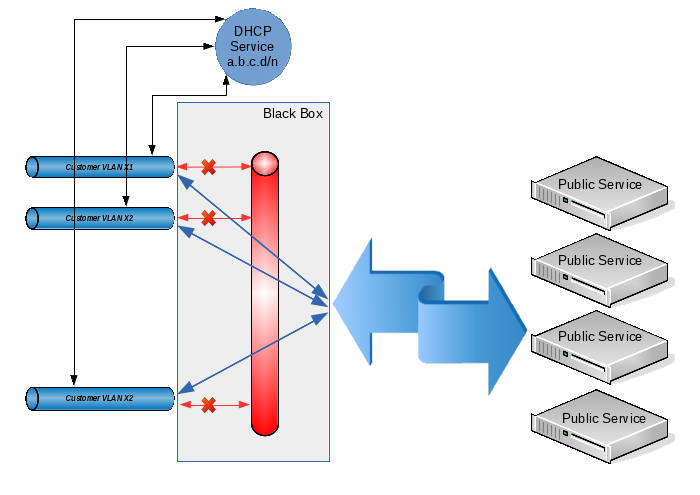
Conditions 1 and 2 are achieved by allocating each client with its own VLAN. Conditions 3-5 can be fulfilled by combining client VLANs with the prohibition of direct traffic transfer between them. In some sources, this technology is called “private VLAN”, in some “port isolation”, and its meaning is this: from each client VLAN you can easily get into a common VLAN (and, accordingly, back), but traffic between the client VLANs is prohibited . Well, to fulfill condition 6we select for all clients a common address space of the form 10.12.8.0/23, and we will issue specific IP addresses on request using DHCP.
Thus, when a client receives a new device, the address for him will be issued automatically (and we will not have problems due to the fact that one client can use units of IP addresses for his needs, while another will require tens or hundreds of them), when adding a new client, we simply create another VLAN and add it to our common group. Even if, due to the large number of client devices, the address space that we originally allocated is exhausted, we can always expand it by changing the settings in only two places (on the DHCP server and on the interface that combines all client VLANs).
Technically, the solution described above can be implemented only by hardware on L3 level switches or by hardware and software on L2 level switches (if only they understood 802.1q) and on any computer with a linux-like operating system. Since I already had a server (which, moreover, was targeted for clients), it would be logical to dwell on a hardware-software version.
So, we program the switch in such a way that on each client VLAN there is one physical switch port in “access mode” and one common port in 802.1q mode (our server will connect to this port). In detail, the setup technology does not sign, because it is quite trivial and depends on the specific model of the switch used.
Next, we proceed to create the configuration for the server. Let the physical interface that connects to the switch's 802.1q port be named eth0. For my specific task, 200 client VLANs with VLAN IDs from 600 to 799 inclusive were needed, so we will create them:
General configuration of the types of VLAN interface names. I want the VLAN interface names to look like “vlanXXX”, where XXX is the VLAN ID:
Directly create a VLAN based on the eth0 interface:
We create a bridge in which we will combine the created vlan:
We unite the created interfaces in the bridge:
Now we assign to the br1 interface an address that will act as a default gateway for all our clients:
And we prohibit traffic between client VLANs using ebtables:
(in this case, the ebtables 'filter' table is used, which prohibits the transfer of traffic between interfaces that enter the bridge as logical ports). If, nevertheless, it is necessary to allow the possibility of transferring traffic between clients under our control (see paragraph 3 of the terms of reference), then instead of the above rule, we establish the following:
Here we work with the 'broute' table. It does not have standard actions for ACCEPT and DROP. The ACCEPT target allows traffic forwarding with specified conditions (i.e., traffic is transmitted at the L2 level), and the DROP target forbids traffic forwarding and ensures its transmission to routing (and, accordingly, we can control it through iptables). However, since all addresses belong to the same IP subnet but can be in different client VLANs, arp proxy will need to be enabled on the br1 interface:
I note that I did not have the task of passing traffic between clients, so the extension described above is purely speculative and has not been tested in practice!
It remains only to configure the DHCP server and put it on the br1 interface. This operation is also trivial; therefore, it is not described in the framework of this article.
Well, does it work? But no matter how:
Everything is fine here: they received one broadcast DHCPDISCOVER request, they answered with one broadcast DHCPOFFER response.
Now let's see what happens on the physical interface:
What happened Yes, everything, as we configured:
Not only did we spotlight all clients with the MAC / IP addresses of one of them, we also received a weak broadcast storm on the physical switch. By the way, some switches simply have a roof from such a storm: QTECH, which is working with us, not only couldn’t miss broadcast to all 200 client VLANs declared (i.e., the end client with arbitrary probability either received its address from a DHCP server, or did not wait from there’s no answer at all), but even forgot the table of MAC addresses known to him (in any case, in the console he showed only one MAC address for all ports). But the ASOTEL switch coped with such a load and clients could get addresses from our DHCP server.
Well, we will correct the situation. It is necessary to force the server to send broadcast only to the VLAN from which the initial request came, and not to multiply it in all available places.
I did not find the DHCP tracking module for broadcasts. As it turned out later, he would not have helped in this case, because The broadcast response is generated by the DHCP server using the
socket system call (PF_PACKET, SOCK_DGRAM, htons (ETH_P_IP))
which does not go through any of the ebtables or iptables tables. Those. if you can still catch the incoming broadcast, then the answers are passed to the driver bypassing the protocol stack. And this is logical: if we ourselves form an ethernet header, then what's the point of additionally processing it with the kernel?
Okay, let’s try to hang DHCP Relay Agent on each client VLAN and transfer requests from it to DHCP server for processing. However, it turned out that the Relay Agent does not catch requests from the interfaces included in the bridge (well, this, too, is probably logical). As soon as the interface was removed from the bridge, the Relay Agent began to catch requests, send them to the server and send responses back to the VLAN to which it was needed. When VLAN was added to the bridge again, the agent’s performance was again disrupted and DHCP became inaccessible to clients.
“Well then!” Said the harsh Siberian men. We will do everything in an adult way.
To begin with, we recall that in modern linux kernels there are such goodies as Virtual Ethernet Device (you can make good pipes from them to distill ethernet traffic inside our computer) and Network Namespace (a tool for isolating the network stack. In hardware routers, this is usually , called VRF). In principle, this task can be done exclusively with Virtual Ethernet (veth), but for the beauty of the solution (and simplification of the DHCP Server-DHCP Relay Agent bundle), we will also use Network Namespace (netns).
After initializing the network in linux, by default there is only one root netns, in which there is a single copy of the network stack, routing tables, interfaces, etc. In the following description, for definiteness, we will use the following terminology:
Network Namespace will be called a “layer” (layer);
let's call root netns a layer “backplate” (although in reality this netns has a name in the form of an empty string);
Our idea is this: we
add each client VLAN to a separate bridge, on the interface of which we will hang DHCP Relay Agent. Through this interface, clients will be able to send broadcast requests to the agent and receive broadcast responses from it.
from each client bridge we will make an ethernet pipe to our main br1. Through a bunch of “customer vlan” - “customer vlan bridge” - “virtual ethernet” - ”br1” useful traffic will pass between the client service and shared external resources.
The DHCP Relay Agent itself lives in one instance (it can listen to several client interfaces) on a special ethernet pipe, on the other side of which there is our DHCP Server.
the entire application level (i.e., everything that does not concern DHCP), will be located at the backplate level;
everything connected with the DHCP Relay Agent is located at the level with the name “relay”;
the DHCP server itself must be accessible both for the DHCP Relay Agent (for processing messages distributed as broadcast and converted by the agent to unicast and vice versa), as well as directly for DHCP clients (for processing a special case: DHCPRELEASE messages sent by the unicast client directly to that DHCP to the server that issued this address).
Taking into account these requirements, the DHCP server itself will be located at the backplate level on the br1 interface, but in order to prevent it from receiving broadcast requests from end clients, special filters will be applied to the interface.
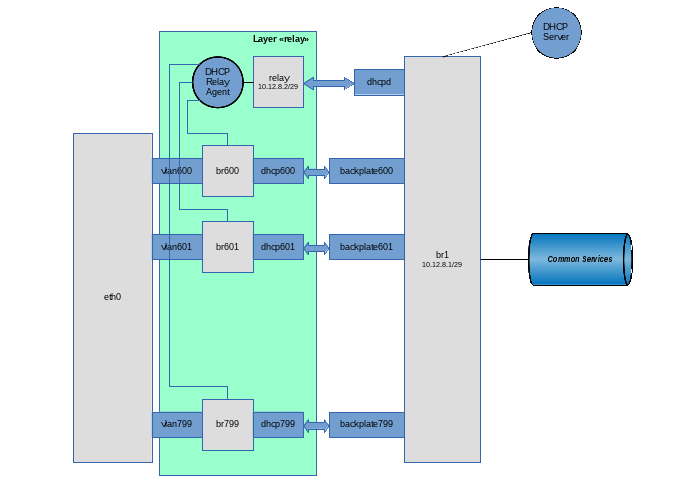
Well, let's go ... Create a “relay” layer
Create a virtual pipe on the backplate layer, intended for communication between the DHCP Relay Agent and the DHCP Server:
Transfer the dhcpd tail (the interface on which the Relay Agent will run) to the relay layer:
Configure the dhcpd interface in the relay layer:
We create our main bridge br1:
Let this bridge act as a smart switch (i.e., it stores a table of MAC addresses and performs forwarding to a specific port, depending on the presence of a target address on it). To do this, set the training time to 30 seconds:
Well, customers are unique identities, they may well create rings. If anyone does this, then let him suffer himself, without affecting others. Those. run on our virtual switch STP:
Because Since this bridge is also the default gateway for clients, we will hang the IP address on it (along with the grid) and raise the interface itself:
We add to the bridge the interface by which the DHCP server will communicate with the agent:
We prohibit traffic between client VLANs using ebtables:
We prohibit the DHCP server from processing broadcast requests (they must be caught by the agent and sent to the server as unicast):
For security, we allow the use of the address allocated for DHCP Relay Agent only on the interface with the name relay:
Okay, last brushstroke. Since I categorically do not trust clients, we make the kernel make sure that the IP packets coming from them have a source address of the form 10.12.8.0/23 (and not, for example, 192.168.1.1). To do this, enable the rp filter on the interface:
We will not transfer the eth0 physical interface from the backplate to the relay layer (well, let's say we will need to hang some other application VLANs on it that are not related to this scheme). Therefore, we will first create VLAN interfaces on the backplate layer, and then transfer them to the relay layer:
General configuration of the types of VLAN interface names. I want the VLAN interface names to look like “vlanXXX”, where XXX is the VLAN ID:
Directly create a VLAN based on the eth0 interface:
Transfer the created vlan600 interface from the backplate layer to the relay layer:
Raise the vlan600 interface, but already in the relay layer:
Create a bridge in the relay layer for this client VLAN (on which we will hang the DHCP Relay Agent).
We want this bridge to work as a hub (i.e., it would broadcast the packet immediately after receiving it, without using the period of collecting information about MAC addresses). To do this, before adding the first interface to the bridge, set its parameters:
In addition, we obviously do not need STP on this bridge:
Raise the bridge interface:
And add the client VLAN to it:
We create an ethernet pipe on the backplate layer (well, it will come there anyway) for connecting the br600 client bridge and our main br1 bridge:
Transfer the second end of the pipe to the relay layer:
And add this pipe end to the bridge:
Well, add the end of the pipe remaining in the backplate layer to the br1 bridge:
Repeat in the loop the operation of creating client VLANs in the required quantity.
Now it’s enough to start the DHCP server itself in the backplate layer and the DHCP Relay Agent in the relay layer. In my case, the assembly from BusyBox is used, which is not critical in this case. Using the ISC agent and server should not cause much difficulty.
So, we start the agent. Br600-br799 are used as client interfaces, dhcpd is used as an interface for communication with a DHCP server, and the DHCP server itself has the address 10.12.8.1:
Well, finally, we start the DHCP server:
In the /etc/udhcpd.conf file, the only line that applies to this scheme is:
That’s it, now broadcast requests in the user VLAN are caught by the DHCP Relay Agent through the corresponding br-interface, after which the unicast request is transmitted to the server via the dhcpd interface. The server sends a unicast response through the relay interface, which the agent receives from the dhcpd interface and translates the broadcast into the source VLAN.
Clients began to receive addresses through DHCP, broadcast-storm disappeared. And the client can send DHCPRELEASE directly to the server at 10.12.8.1
© Copiright 2015 by Vedga . Copying text to other resources without the consent of the author is prohibited.
What to look for this article:
By the term “client” we mean the zone of responsibility for the totality of network devices.
It is required to provide access for several hundred clients to certain shared resources in such a mode so that:
- Each client did not see the traffic of other clients.
- Failures of one client (broadcast-storm, conflicts of IP addresses, unauthorized client DHCP-servers, etc.) should not affect the operation of both other clients and the entire system.
- Each client should not directly access the resources of other clients (although, as a special case, it is possible to provide for the resolution of this traffic, but with its centralized control and / or management).
- Clients should be able to access shared external resources (which can be either individual servers or the Internet as a whole).
- Shared resources should also be able to access client resources (of course, provided that the shared resource knows the IP address of the client resource).
- Address space for clients is allocated centrally and its administration should not be overly complex.
Examples of practical applications include isolating local area networks of departments in a large organization, organizing VoIP communications or accessing the Internet for several independent consumers, etc.
Conditions 1 and 2 are achieved by allocating each client with its own VLAN. Conditions 3-5 can be fulfilled by combining client VLANs with the prohibition of direct traffic transfer between them. In some sources, this technology is called “private VLAN”, in some “port isolation”, and its meaning is this: from each client VLAN you can easily get into a common VLAN (and, accordingly, back), but traffic between the client VLANs is prohibited . Well, to fulfill condition 6we select for all clients a common address space of the form 10.12.8.0/23, and we will issue specific IP addresses on request using DHCP.
Thus, when a client receives a new device, the address for him will be issued automatically (and we will not have problems due to the fact that one client can use units of IP addresses for his needs, while another will require tens or hundreds of them), when adding a new client, we simply create another VLAN and add it to our common group. Even if, due to the large number of client devices, the address space that we originally allocated is exhausted, we can always expand it by changing the settings in only two places (on the DHCP server and on the interface that combines all client VLANs).
Technically, the solution described above can be implemented only by hardware on L3 level switches or by hardware and software on L2 level switches (if only they understood 802.1q) and on any computer with a linux-like operating system. Since I already had a server (which, moreover, was targeted for clients), it would be logical to dwell on a hardware-software version.
So, we program the switch in such a way that on each client VLAN there is one physical switch port in “access mode” and one common port in 802.1q mode (our server will connect to this port). In detail, the setup technology does not sign, because it is quite trivial and depends on the specific model of the switch used.
Next, we proceed to create the configuration for the server. Let the physical interface that connects to the switch's 802.1q port be named eth0. For my specific task, 200 client VLANs with VLAN IDs from 600 to 799 inclusive were needed, so we will create them:
General configuration of the types of VLAN interface names. I want the VLAN interface names to look like “vlanXXX”, where XXX is the VLAN ID:
vconfig set_name_type VLAN_PLUS_VID_NO_PAD
Directly create a VLAN based on the eth0 interface:
vconfig add eth0 600
ifconfig vlan600 up
vconfig add eth0 601
ifconfig vlan601 up
...
vconfig add eth0 799
ifconfig vlan799 up
We create a bridge in which we will combine the created vlan:
brctl addbr br1
ifconfig br1 up
We unite the created interfaces in the bridge:
brctl addif br1 vlan600
brctl addif br1 vlan601
...
brctl addif br1 vlan799
Now we assign to the br1 interface an address that will act as a default gateway for all our clients:
ifconfig br1 10.12.8.1/23
And we prohibit traffic between client VLANs using ebtables:
ebtables -A FORWARD --logical-in br1 --logical-out br1 -j DROP
(in this case, the ebtables 'filter' table is used, which prohibits the transfer of traffic between interfaces that enter the bridge as logical ports). If, nevertheless, it is necessary to allow the possibility of transferring traffic between clients under our control (see paragraph 3 of the terms of reference), then instead of the above rule, we establish the following:
ebtables -t broute -A BROUTING -p ipv4 --logical-in -j DROP
ebtables -t broute -A BROUTING -p arp --logical-in -j DROP
Here we work with the 'broute' table. It does not have standard actions for ACCEPT and DROP. The ACCEPT target allows traffic forwarding with specified conditions (i.e., traffic is transmitted at the L2 level), and the DROP target forbids traffic forwarding and ensures its transmission to routing (and, accordingly, we can control it through iptables). However, since all addresses belong to the same IP subnet but can be in different client VLANs, arp proxy will need to be enabled on the br1 interface:
sysctl -w net.ipv4.conf.br1.proxy_arp = 1
I note that I did not have the task of passing traffic between clients, so the extension described above is purely speculative and has not been tested in practice!
It remains only to configure the DHCP server and put it on the br1 interface. This operation is also trivial; therefore, it is not described in the framework of this article.
Well, does it work? But no matter how:
# tcpdump -e -v -n -i br1 udp port 67 or port 68
tcpdump: listening on br1, link-type EN10MB (Ethernet), capture size 65535 bytes
14: 26: 38.164169 00: 0b: 82: 3b: 9c: 96> ff: ff: ff: ff: ff: ff, ethertype IPv4 (0x0800), length 590: (tos 0x0, ttl 64, id 0, offset 0 , flags [none], proto UDP (17), length 576)
    0.0.0.0.68> 255.255.255.255.67: BOOTP / DHCP, Request from 00: 0b: 82: 3b: 9c: 96, length 548, xid 0x3c12d61a, Flags [none]
          Client-Ethernet-Address 00: 0b: 82: 3b: 9c: 96
          Vendor-rfc1048 extensions
            Magic Cookie 0x63825363
            DHCP-Message Option 53, length 1: Discover
            Client-ID Option 61, length 7: ether 00: 0b: 82: 3b: 9c: 96
            Vendor-Class Option 60, length 16: "GXV dslforum.org"
            T125 Option 125, length 36: 3561.520160816,808469048,838994992,808469048,842220089,1127822851,122116182,858862640
            Parameter-Request Option 55, length 11:
              Subnet-Mask, Time-Zone, Default-Gateway, Domain-Name-Server
              Hostname, Domain-Name, BR, NTP
              Vendor-Option, TFTP, Option 125
14: 26: 38.171041 00: 25: 90: d3: 5e: fa> ff: ff: ff: ff: ff: ff, ethertype IPv4 (0x0800), length 336: (tos 0x0, ttl 64, id 0, offset 0 , flags [none], proto UDP (17), length 322)
    10.12.8.1.67> 255.255.255.255.68: BOOTP / DHCP, Reply, length 294, xid 0x3c12d61a, Flags [none]
          Your-IP 12.10.8.200
          Client-Ethernet-Address 00: 0b: 82: 3b: 9c: 96
          Vendor-rfc1048 extensions
            Magic Cookie 0x63825363
            DHCP-Message Option 53, length 1: Offer
            Server-ID Option 54, length 4: 10.12.8.1
            Lease-Time Option 51, length 4: 7200
            Subnet-Mask Option 1, length 4: 255.255.254.0
            Default-Gateway Option 3, length 4: 10.12.8.1
Everything is fine here: they received one broadcast DHCPDISCOVER request, they answered with one broadcast DHCPOFFER response.
Now let's see what happens on the physical interface:
# tcpdump -e -n -i eth0 udp port 67 or port 68
tcpdump: WARNING: eth0: no IPv4 address assigned
tcpdump: verbose output suppressed, use -v or -vv for full protocol decode
listening on eth0, link-type EN10MB (Ethernet), capture size 65535 bytes
14: 31: 07.829289 00: 0b: 82: 3b: 9c: 96> ff: ff: ff: ff: ff: ff, ethertype 802.1Q (0x8100), length 594: vlan 603, p 0, ethertype IPv4, 0.0. 0.0.68> 255.255.255.255.67: BOOTP / DHCP, Request from 00: 0b: 82: 3b: 9c: 96, length 548
14: 31: 07.834962 00: 25: 90: d3: 5e: fa> ff: ff: ff: ff: ff: ff, ethertype 802.1Q (0x8100), length 340: vlan 799, p 0, ethertype IPv4, 10.12. 8.1.67> 255.255.255.255.68: BOOTP / DHCP, Reply, length 294
14: 31: 07.834966 00: 25: 90: d3: 5e: fa> ff: ff: ff: ff: ff: ff, ethertype 802.1Q (0x8100), length 340: vlan 798, p 0, ethertype IPv4, 10.12. 8.1.67> 255.255.255.255.68: BOOTP / DHCP, Reply, length 294
14: 31: 07.834968 00: 25: 90: d3: 5e: fa> ff: ff: ff: ff: ff: ff, ethertype 802.1Q (0x8100), length 340: vlan 797, p 0, ethertype IPv4, 10.12. 8.1.67> 255.255.255.255.68: BOOTP / DHCP, Reply, length 294
14: 31: 07.834970 00: 25: 90: d3: 5e: fa> ff: ff: ff: ff: ff: ff, ethertype 802.1Q (0x8100), length 340: vlan 796, p 0, ethertype IPv4, 10.12. 8.1.67> 255.255.255.255.68: BOOTP / DHCP, Reply, length 294
14: 31: 07.834972 00: 25: 90: d3: 5e: fa> ff: ff: ff: ff: ff: ff, ethertype 802.1Q (0x8100), length 340: vlan 795, p 0, ethertype IPv4, 10.12. 8.1.67> 255.255.255.255.68: BOOTP / DHCP, Reply, length 294
14: 31: 07.834974 00: 25: 90: d3: 5e: fa> ff: ff: ff: ff: ff: ff, ethertype 802.1Q (0x8100), length 340: vlan 794, p 0, ethertype IPv4, 10.12. 8.1.67> 255.255.255.255.68: BOOTP / DHCP, Reply, length 294
14: 31: 07.834976 00: 25: 90: d3: 5e: fa> ff: ff: ff: ff: ff: ff, ethertype 802.1Q (0x8100), length 340: vlan 793, p 0, ethertype IPv4, 10.12. 8.1.67> 255.255.255.255.68: BOOTP / DHCP, Reply, length 294
14: 31: 07.834978 00: 25: 90: d3: 5e: fa> ff: ff: ff: ff: ff: ff, ethertype 802.1Q (0x8100), length 340: vlan 792, p 0, ethertype IPv4, 10.12. 8.1.67> 255.255.255.255.68: BOOTP / DHCP, Reply, length 294
...
What happened Yes, everything, as we configured:
- DHCPDISCOVER was received with VLAN 603;
- the request was sent via br1 to our DHCP server;
- the server responded with a DHCPOFFER response to br1;
- the br1 interface propagated this answer (since, according to the DHCP standard, it is broadcast both in L3 and L2) for all client VLANs.
Not only did we spotlight all clients with the MAC / IP addresses of one of them, we also received a weak broadcast storm on the physical switch. By the way, some switches simply have a roof from such a storm: QTECH, which is working with us, not only couldn’t miss broadcast to all 200 client VLANs declared (i.e., the end client with arbitrary probability either received its address from a DHCP server, or did not wait from there’s no answer at all), but even forgot the table of MAC addresses known to him (in any case, in the console he showed only one MAC address for all ports). But the ASOTEL switch coped with such a load and clients could get addresses from our DHCP server.
Well, we will correct the situation. It is necessary to force the server to send broadcast only to the VLAN from which the initial request came, and not to multiply it in all available places.
I did not find the DHCP tracking module for broadcasts. As it turned out later, he would not have helped in this case, because The broadcast response is generated by the DHCP server using the
socket system call (PF_PACKET, SOCK_DGRAM, htons (ETH_P_IP))
which does not go through any of the ebtables or iptables tables. Those. if you can still catch the incoming broadcast, then the answers are passed to the driver bypassing the protocol stack. And this is logical: if we ourselves form an ethernet header, then what's the point of additionally processing it with the kernel?
Okay, let’s try to hang DHCP Relay Agent on each client VLAN and transfer requests from it to DHCP server for processing. However, it turned out that the Relay Agent does not catch requests from the interfaces included in the bridge (well, this, too, is probably logical). As soon as the interface was removed from the bridge, the Relay Agent began to catch requests, send them to the server and send responses back to the VLAN to which it was needed. When VLAN was added to the bridge again, the agent’s performance was again disrupted and DHCP became inaccessible to clients.
“Well then!” Said the harsh Siberian men. We will do everything in an adult way.
To begin with, we recall that in modern linux kernels there are such goodies as Virtual Ethernet Device (you can make good pipes from them to distill ethernet traffic inside our computer) and Network Namespace (a tool for isolating the network stack. In hardware routers, this is usually , called VRF). In principle, this task can be done exclusively with Virtual Ethernet (veth), but for the beauty of the solution (and simplification of the DHCP Server-DHCP Relay Agent bundle), we will also use Network Namespace (netns).
After initializing the network in linux, by default there is only one root netns, in which there is a single copy of the network stack, routing tables, interfaces, etc. In the following description, for definiteness, we will use the following terminology:
Network Namespace will be called a “layer” (layer);
let's call root netns a layer “backplate” (although in reality this netns has a name in the form of an empty string);
Our idea is this: we
add each client VLAN to a separate bridge, on the interface of which we will hang DHCP Relay Agent. Through this interface, clients will be able to send broadcast requests to the agent and receive broadcast responses from it.
from each client bridge we will make an ethernet pipe to our main br1. Through a bunch of “customer vlan” - “customer vlan bridge” - “virtual ethernet” - ”br1” useful traffic will pass between the client service and shared external resources.
The DHCP Relay Agent itself lives in one instance (it can listen to several client interfaces) on a special ethernet pipe, on the other side of which there is our DHCP Server.
the entire application level (i.e., everything that does not concern DHCP), will be located at the backplate level;
everything connected with the DHCP Relay Agent is located at the level with the name “relay”;
the DHCP server itself must be accessible both for the DHCP Relay Agent (for processing messages distributed as broadcast and converted by the agent to unicast and vice versa), as well as directly for DHCP clients (for processing a special case: DHCPRELEASE messages sent by the unicast client directly to that DHCP to the server that issued this address).
Taking into account these requirements, the DHCP server itself will be located at the backplate level on the br1 interface, but in order to prevent it from receiving broadcast requests from end clients, special filters will be applied to the interface.
Well, let's go ... Create a “relay” layer
ip netns add relay
Create a virtual pipe on the backplate layer, intended for communication between the DHCP Relay Agent and the DHCP Server:
ip link add relay type veth peer name dhcpd
Transfer the dhcpd tail (the interface on which the Relay Agent will run) to the relay layer:
ip link set dhcpd netns relay
Configure the dhcpd interface in the relay layer:
ip netns exec relay ifconfig dhcpd 10.12.8.2/23
ip netns exec relay ifconfig dhcpd up
We create our main bridge br1:
brctl addbr br1
Let this bridge act as a smart switch (i.e., it stores a table of MAC addresses and performs forwarding to a specific port, depending on the presence of a target address on it). To do this, set the training time to 30 seconds:
brctl setfd br1 30
Well, customers are unique identities, they may well create rings. If anyone does this, then let him suffer himself, without affecting others. Those. run on our virtual switch STP:
brctl stp br1 on
Because Since this bridge is also the default gateway for clients, we will hang the IP address on it (along with the grid) and raise the interface itself:
ifconfig br1 10.12.8.1/23
ifconfig br1 up
We add to the bridge the interface by which the DHCP server will communicate with the agent:
brctl addif br1 relay
We prohibit traffic between client VLANs using ebtables:
ebtables -A FORWARD --logical-in br1 --logical-out br1 -j DROP
We prohibit the DHCP server from processing broadcast requests (they must be caught by the agent and sent to the server as unicast):
ebtables -A INPUT --logical-in br1 --pkttype-type broadcast --protocol IPv4 --ip-protocol udp --ip-destination-port 67 -j DROP
For security, we allow the use of the address allocated for DHCP Relay Agent only on the interface with the name relay:
ebtables -A INPUT --in-interface! relay --protocol IPv4 --ip-source 10.12.8.2/32 -j DROP
Okay, last brushstroke. Since I categorically do not trust clients, we make the kernel make sure that the IP packets coming from them have a source address of the form 10.12.8.0/23 (and not, for example, 192.168.1.1). To do this, enable the rp filter on the interface:
sysctl -w net.ipv4.conf.br1.rp_filter = 1
We will not transfer the eth0 physical interface from the backplate to the relay layer (well, let's say we will need to hang some other application VLANs on it that are not related to this scheme). Therefore, we will first create VLAN interfaces on the backplate layer, and then transfer them to the relay layer:
General configuration of the types of VLAN interface names. I want the VLAN interface names to look like “vlanXXX”, where XXX is the VLAN ID:
vconfig set_name_type VLAN_PLUS_VID_NO_PAD
Directly create a VLAN based on the eth0 interface:
vconfig add eth0 600
Transfer the created vlan600 interface from the backplate layer to the relay layer:
ip link set vlan600 netns relay
Raise the vlan600 interface, but already in the relay layer:
ip netns exec relay ifconfig vlan600 up
Create a bridge in the relay layer for this client VLAN (on which we will hang the DHCP Relay Agent).
ip netns exec relay brctl addbr br600
We want this bridge to work as a hub (i.e., it would broadcast the packet immediately after receiving it, without using the period of collecting information about MAC addresses). To do this, before adding the first interface to the bridge, set its parameters:
ip netns exec relay brctl setfd br600 0
In addition, we obviously do not need STP on this bridge:
ip netns exec relay brctl stp br600 off
Raise the bridge interface:
ip netns exec relay ifconfig br600 up
And add the client VLAN to it:
ip netns exec relay brctl addif br600 vlan600
We create an ethernet pipe on the backplate layer (well, it will come there anyway) for connecting the br600 client bridge and our main br1 bridge:
ip link add dhcp600 type veth peer name backplate600
Transfer the second end of the pipe to the relay layer:
ip link set backplate600 netns relay
And add this pipe end to the bridge:
ip netns exec relay brctl addif br600 backplate600
Well, add the end of the pipe remaining in the backplate layer to the br1 bridge:
brctl addif br1 dhcp600
Repeat in the loop the operation of creating client VLANs in the required quantity.
Now it’s enough to start the DHCP server itself in the backplate layer and the DHCP Relay Agent in the relay layer. In my case, the assembly from BusyBox is used, which is not critical in this case. Using the ISC agent and server should not cause much difficulty.
So, we start the agent. Br600-br799 are used as client interfaces, dhcpd is used as an interface for communication with a DHCP server, and the DHCP server itself has the address 10.12.8.1:
ip netns exec relay / usr / sbin / dhcprelay br600, br601, ..., br799 dhcpd 10.12.8.1
Well, finally, we start the DHCP server:
/ usr / sbin / udhcpd /etc/udhcpd.conf
In the /etc/udhcpd.conf file, the only line that applies to this scheme is:
# The name of the interface on which the DHCP server lives on
interface br1
That’s it, now broadcast requests in the user VLAN are caught by the DHCP Relay Agent through the corresponding br-interface, after which the unicast request is transmitted to the server via the dhcpd interface. The server sends a unicast response through the relay interface, which the agent receives from the dhcpd interface and translates the broadcast into the source VLAN.
Clients began to receive addresses through DHCP, broadcast-storm disappeared. And the client can send DHCPRELEASE directly to the server at 10.12.8.1
© Copiright 2015 by Vedga . Copying text to other resources without the consent of the author is prohibited.
What to look for this article: