 May 27, 2014 at 13:56
Writing MarkerInfoWindow for osmdroid
This article is intended for those who have difficulties connecting infoWindow to osmdroid and working with AsyncTask, and simply for those who have not done anything like this before. Here I wrote about how I created a window for receiving data about a car in the transport monitoring service.
The bottom line is that when you click on the marker, some data is taken from the object, other data is loaded from the API, written to the application database, and then displayed in the InfoWindow object.
We start by creating an xml file with infoWindow description, add fields with the headers of the transport criteria.

MarkerInfoWindow allows you to record in Title, Description, Subdescription, I used only Descripton for all the necessary records. We will subsequently transfer the data there as a string with hyphens.
The bottom line is that when you click on the marker, some data is taken from the object, other data is loaded from the API, written to the application database, and then displayed in the InfoWindow object.
We start by creating an xml file with infoWindow description, add fields with the headers of the transport criteria.
MarkerInfoWindow allows you to record in Title, Description, Subdescription, I used only Descripton for all the necessary records. We will subsequently transfer the data there as a string with hyphens.
The markup is as follows:
Next, to display the necessary data, we write our CarInfoWindow class:
public class CarInfoWindow extends MarkerInfoWindow {
    Car mCar;
    Marker mMarker;
    CarInfoTask carInfoTask;
    Boolean stopped = false;
    Drawable icon;
    String active;
    public CarInfoWindow(int layoutResId, MapView mapView) {
        super(layoutResId, mapView);
    }
    //при открытии запускаем asyncTask
    @Override
    public void onOpen(final Object item) {
        if (!stopped) {
            carInfoTask = new CarInfoTask();
            carInfoTask.execute(item);
        }
        super.onOpen(item);
    }
    //при закрытии можем поменять иконку маркера
    @Override
    public void onClose() {
        stopped = false;
        super.onClose();
        if (!(mCar.getLastUpdate() == null)) {
            if (((System.currentTimeMillis() - Long.parseLong(mCar.getLastUpdate())) / 3600000) > 1) {
                active = "0"; //car is not active
            }
            else {
                active = "1";
            }
        }
        String fileName = Environment.getExternalStorageDirectory()+"/automap/cars/icons/"+mCar.getIconIndex()+"/"+active+"/icon.png";
        icon = Utils.loadIcon(fileName, Float.parseFloat(mCar.getDirection()), mCar.getIconType());
        mMarker.setIcon(icon);
    }
    class CarInfoTask extends AsyncTask {
        @Override
        protected void onPreExecute() {
            super.onPreExecute();
        }
        @Override
        //операции по обработке данных производятся в этом методе
        protected Void doInBackground(Object... params) {
            try {
		//задаем нужный маркер, к которому привязан объект Car с нужными данными
                mMarker = (Marker)params[0];
                mCar = (Car) mMarker.getRelatedObject();
		//Данные, которые нужно передать в infoWindow
                String markName;
                String carModelName;
                String groupName;
                String carLastUpdate;
                Context context = getView().getContext();
                //берем token, и данные из объекта
                Token token = Prefs.getToken(getView().getContext());
                String markId = mCar.getMarkId();
                String modelId = mCar.getModelId();
                String orgId = mCar.getOrganizationId();
                String groupId = mCar.getGroupId();
                carLastUpdate = mCar.getLastUpdate();
		//что-нибудь делаем
                String formattedDate = "";
                if (!(carLastUpdate == null)) {
                    long unixSeconds = Long.parseLong(carLastUpdate);
                    Date date = new Date(unixSeconds);
                    SimpleDateFormat sdf = new SimpleDateFormat("dd.MM.yyyy  HH:mm:ss ");
                    formattedDate = sdf.format(date);
                }
                String organizationName = DbHelper.getInstance(context).getOrganizationStatById(orgId).getName();
                List marksList = null;
                List carModelsList = null;
                List groupsList = null;
                //делаем запрос в API, берем mark и model по id
                try {
                    //используем retrofit
                    carModelsList = Api.getService(context).getModels(token.getValue(), markId);
                    int size = carModelsList.size();
                    for (int i=0; i
Теперь при создании маркера остается всего лишь к маркеру привязать нужное окно
marker.setInfoWindow(infoWindow);
В результате проделанных манипуляций получаем нечто вроде:
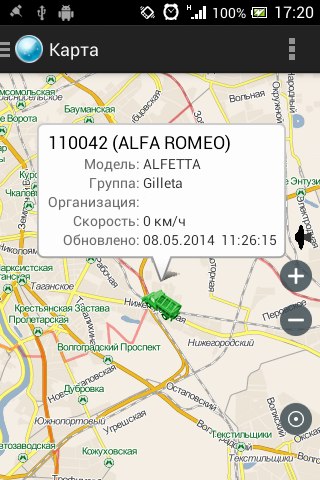
P.S. Несмотря на то, что маркер — иконка грузовика, а в описании это Alfa Romeo, всё работает верно.








