 November 21, 2013 at 13:35
Chinese air mice
Cheap air mice have appeared recently. They allow you to move the cursor on the screen, moving a hand with an air mouse in the air. In this case, only the hand should move, and not the whole hand. The principle of operation is based on the use of a gyroscopic sensor. Of course, using an air mouse is less convenient than using a regular mouse. But it is not intended for ordinary use with a computer. The purpose of the air mouse is to control a computer, media player or TV from an armchair or sofa.
I have long wanted to try aero mice, so when it became possible to order products for a test from another Chinese online store, I ordered two aero mice at once - one in the form of a remote control, and the second with a built-in Russian keyboard.

The first remote control mouse called “2.4GHz Mini Wireless Gyroscope Flying Mouse Air Mouse with USB Receiver for PC TV BOX 3D Sense Game - Black TTH-117941” costs $ 17.23 .
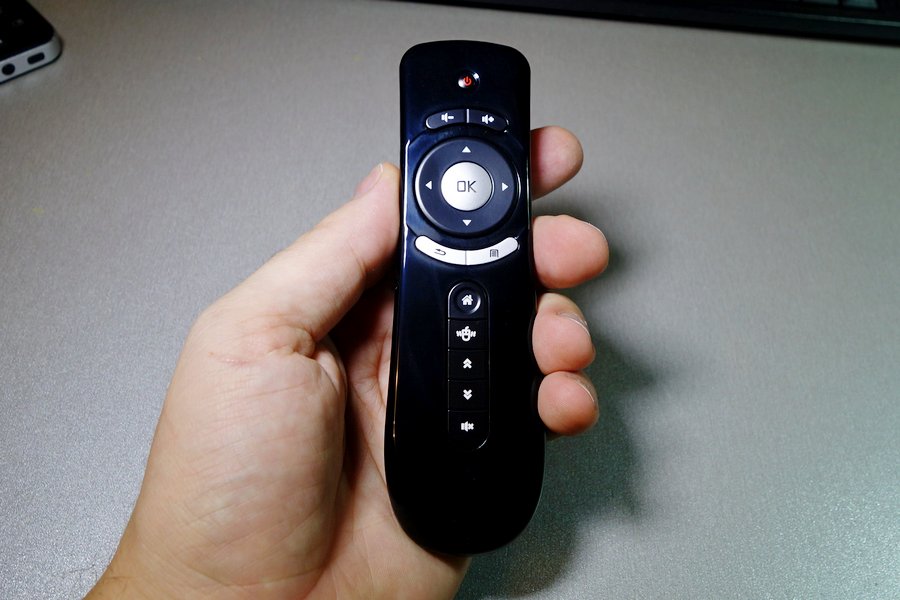
A micro receiver is connected to the USB port. The device is defined as a standard mouse and keyboard. The aerial mouse transmits signals at a frequency of 2.4GHz and confidently works at fairly large distances. For me, she confidently worked from the farthest point of the apartment through two concrete walls. The air mouse is powered by two AAA batteries.

I shot a short video to demonstrate the work of the air mouse.
www.youtube.com/watch?v=qlzgJ-M6AS0
To save battery, the mouse turns off after 15 seconds of inactivity. To enable, you need to press any button. When the air mouse sends signals to the receiver, a green LED lights up on it.
The air mouse has 15 buttons:
Power - Power (turns off the computer);
2 volume buttons - keyboard volume buttons;
OK - left mouse button;
4 arrows, around OK, - keyboard arrows;
“Return” - right mouse button;
“Menu” - the button “Menu” of the keyboard;
“Home” - the “Home” button of the keyboard;
“Mouse” - enable / disable the air mouse;
Double up and down arrows - PgUp, PgDn;
"Off sound "- button" Off. sound "keyboard.
The air mouse has two modes of speed: standard and reduced.
Instructions from the box:

If you adapt, using the air mouse is very convenient. For a media player on Android, this is a great option.
The second device is a Russian keyboard with a built-in air mouse called “Russian Keyboard KP-810-16A 2.4GHz Wireless 3 Axial Gyro Fly / Air Mouse Mini Gaming Keyboard for TV Box PC Laptop CBW-174871” for $ 27.49 .
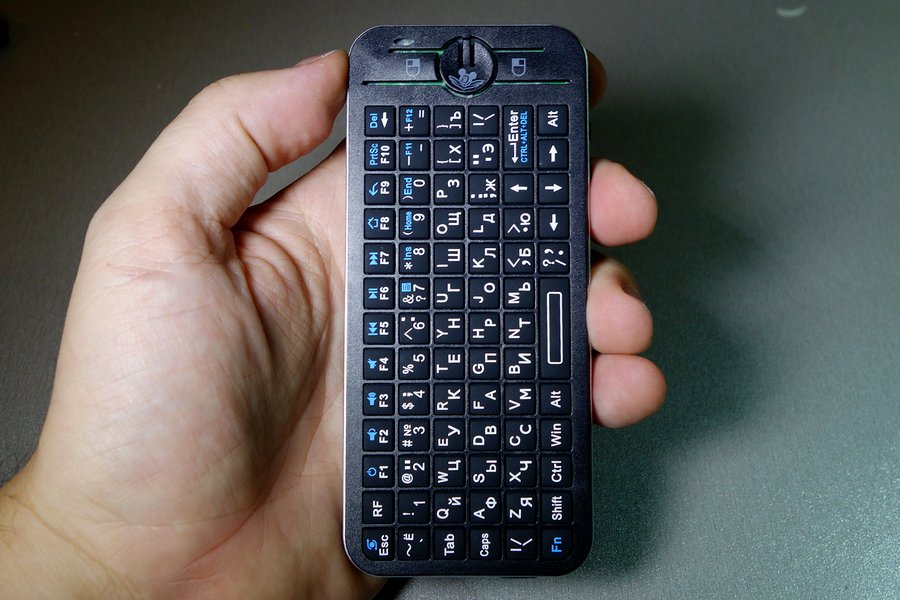
The device is powered by a 300 mAh Li-Ion battery, by default the receiver is located under a cover in a special compartment.

Included is a charging cable through which you can simultaneously connect the receiver. The keyboard has all the keys of a standard keyboard, including additional ones.

Bottom - MiniUSB charging port and power switch.

The big round button turns on the air mouse. There are two modes: in the first, the air mouse only works when this button is pressed, in the second it works constantly. On the sides of the big round buttons are mouse buttons. The only strange thing is that the left is on the right, and the right is on the left. Two round buttons on the right side are PgUp and PgDn. The third button does nothing.

By pressing Fn + Esc, the orientation of the air mouse is switched: it can work both in the vertical and horizontal position of the device.
The device operates at a frequency of 2.4GHz. The range is slightly lower than that of an air mouse in the form of a console, but still, through one concrete wall, the device worked confidently.
Other devices are also available in the same case - for example, a keyboard with an air mouse and a universal IR remote control on the back. The holes for the remote control buttons are visible on the inside of the case. This is what the device has inside.

The main board and on it a small scarf of a radio transmitter.

As an air mouse, using this device is somewhat less convenient than an air mouse in the form of a remote control, but the device is more universal. For example, it’s very convenient to enter characters in the Youtube search bar on a TV or media player.
Instructions:

Both devices are very useful for controlling equipment from the couch.
In addition to articles on Habré, I write every day on my blog ammo1.livejournal.com .
First of all, a blog about technology: I write reviews, share experiences, talk about all sorts of interesting things. Basically this is not in the Habr format, so I only write there.
If you do not have an account on Habrahabr, you can read and comment on our articles on BoxOverview.com
I have long wanted to try aero mice, so when it became possible to order products for a test from another Chinese online store, I ordered two aero mice at once - one in the form of a remote control, and the second with a built-in Russian keyboard.
The first remote control mouse called “2.4GHz Mini Wireless Gyroscope Flying Mouse Air Mouse with USB Receiver for PC TV BOX 3D Sense Game - Black TTH-117941” costs $ 17.23 .
A micro receiver is connected to the USB port. The device is defined as a standard mouse and keyboard. The aerial mouse transmits signals at a frequency of 2.4GHz and confidently works at fairly large distances. For me, she confidently worked from the farthest point of the apartment through two concrete walls. The air mouse is powered by two AAA batteries.
I shot a short video to demonstrate the work of the air mouse.
www.youtube.com/watch?v=qlzgJ-M6AS0
To save battery, the mouse turns off after 15 seconds of inactivity. To enable, you need to press any button. When the air mouse sends signals to the receiver, a green LED lights up on it.
The air mouse has 15 buttons:
Power - Power (turns off the computer);
2 volume buttons - keyboard volume buttons;
OK - left mouse button;
4 arrows, around OK, - keyboard arrows;
“Return” - right mouse button;
“Menu” - the button “Menu” of the keyboard;
“Home” - the “Home” button of the keyboard;
“Mouse” - enable / disable the air mouse;
Double up and down arrows - PgUp, PgDn;
"Off sound "- button" Off. sound "keyboard.
The air mouse has two modes of speed: standard and reduced.
Instructions from the box:
If you adapt, using the air mouse is very convenient. For a media player on Android, this is a great option.
The second device is a Russian keyboard with a built-in air mouse called “Russian Keyboard KP-810-16A 2.4GHz Wireless 3 Axial Gyro Fly / Air Mouse Mini Gaming Keyboard for TV Box PC Laptop CBW-174871” for $ 27.49 .
The device is powered by a 300 mAh Li-Ion battery, by default the receiver is located under a cover in a special compartment.
Included is a charging cable through which you can simultaneously connect the receiver. The keyboard has all the keys of a standard keyboard, including additional ones.
Bottom - MiniUSB charging port and power switch.
The big round button turns on the air mouse. There are two modes: in the first, the air mouse only works when this button is pressed, in the second it works constantly. On the sides of the big round buttons are mouse buttons. The only strange thing is that the left is on the right, and the right is on the left. Two round buttons on the right side are PgUp and PgDn. The third button does nothing.
By pressing Fn + Esc, the orientation of the air mouse is switched: it can work both in the vertical and horizontal position of the device.
The device operates at a frequency of 2.4GHz. The range is slightly lower than that of an air mouse in the form of a console, but still, through one concrete wall, the device worked confidently.
Other devices are also available in the same case - for example, a keyboard with an air mouse and a universal IR remote control on the back. The holes for the remote control buttons are visible on the inside of the case. This is what the device has inside.
The main board and on it a small scarf of a radio transmitter.
As an air mouse, using this device is somewhat less convenient than an air mouse in the form of a remote control, but the device is more universal. For example, it’s very convenient to enter characters in the Youtube search bar on a TV or media player.
Instructions:
Both devices are very useful for controlling equipment from the couch.
In addition to articles on Habré, I write every day on my blog ammo1.livejournal.com .
First of all, a blog about technology: I write reviews, share experiences, talk about all sorts of interesting things. Basically this is not in the Habr format, so I only write there.
If you do not have an account on Habrahabr, you can read and comment on our articles on BoxOverview.com









