 November 13, 2012 at 23:01
Pocketbook 611 E-Book Recovery
A brief plot of previous episodes : / “Yesterday I was left to“ look ”with a dead Pocketbook e-book on E-Ink, model 611 <....> Now I am looking for an image from an internal memory card of a working copy to fill it with the one under review and finally find out , is this dead state due to a failed update, or is there a problem in the device’s components ”
And now a new series:
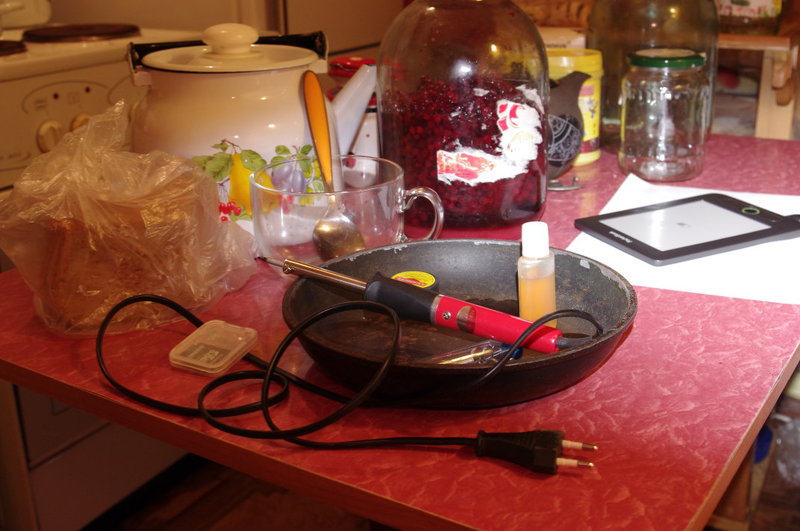
How to restore Pocketbook 611 Obreey using a frying pan, soldering iron, SKF, SD <-microSD adapter and Pocketbook programmer (respect him)? - under cat.
Condition before the following steps:

As follows from the previous post, immediately after the publication, Mikhail Boyko, a programmer at Pocketbook, contacted me (on my own initiative!). Michael offered help in restoring the device, and immediately gave 6 valuable recommendations, using which the first results were obtained:
1. If possible, see the voltage on the battery. If you charged it, then there should be more than 4.0 volts. If there 3.6 is bad, if 3.2 or less, then it is very bad.
Good advice. It was a pity to check there was nothing. But in the end, the battery was nothing to do with
4. Make a memory image (I assume that you have access to the Linux machine)
In my case (Fedora 17), the dd command was launched through su, and the device was mmcblk0 (a microSD card connected via an adapter to the laptop card reader). In more detail, all actions in the terminal are reflected in the general recovery log
5. If possible, please send the first 16 megabytes of the card image, I will try to write them to my device and see what happened there.
This item also did not raise any questions; the archive with the image was immediately sent for research
6. I took a memory image from my device, try to write it to your card (after you made a backup) and turn on the device with the update buttons held down. The screen should give signs of life. If this happens, try installing the latest official firmware from the site.
After recording the image on the internal memory card and installing it back into the book, the most interesting thing began - it came to life! “As it should”, the backlight of the central joystick button blinked at the first press of the power button, and the update to version 15.8.0 taken from the official Pocketbook website worked properly.
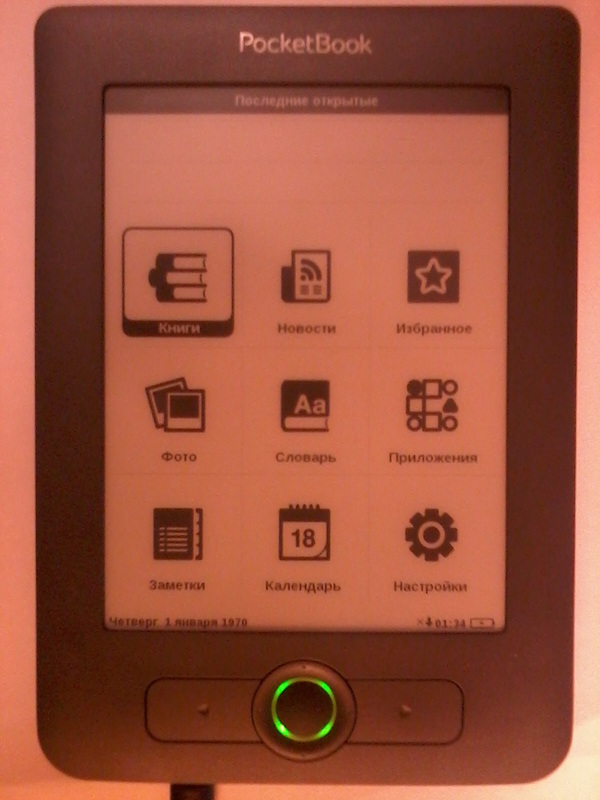
The update took no more than 3 minutes, and here is the main menu of the book, until that moment unfamiliar.


It took about 30 minutes more to test all the functions in order to conclude that there was still something wrong with the book: with any attempt to use WiFi (update, connection check), it would hang with different special effects. The connection establishment window that has not been drawn to the end, a black screen, a black window ...
But after another letter to Mikhail, the reason for this behavior became clear, and the reason for the original problem was discovered:
I looked at the image of the card that you sent. The user installed the firmware from 613 (611 plus) to 611. The platforms 613 and 611 are very different in hardware, although they look almost identical in appearance. Firmware 611, on which firmware from 613 was installed, for some reason did not notice a catch and a bootloader from 613 was installed on 611, which cannot work on hardware from 611. I will modify the image of the card you sent, write the “correct” bootloader there and send you to write to the device. The image that I sent you earlier (as I understand it, you managed to start it with it), most likely, does not quite fit your copy of the book, because waveforms differ there (they are unique for each batch of screens) and, perhaps, there are some other bindings to hardware. Within an hour I will prepare a card image and send it to you in the mail.
I could only wait for the image (during this break, I restored the battery connector using the inventory from the title photo of the post):
Attached is an archive with a modified image of the card.
It would seem that this is the last step to victory, but no! It was after this stage that microSD cards began to glitch shamelessly ... Unread images of updates, file read error when trying to update ... This could only be stopped by formatting the internal memory and external SD card via the device’s interface. Only then the update was successful. In general, there is a feeling that the problem is with the external SD card (Apacer 1Gb, I can’t say from the kit or bought separately)
And only after reformatting and rewriting the official firmware 15.8.0 the update was successful, and WiFi started

End of story, I hope I. Tomorrow I will give the book to the owner
Full chronological log of the terminal: goo.gl/VBCZu
Archive with all the images involved in the restoration:goo.gl/QEL9Z
Thanks again to Mikhail Boyko for the recipe!
PS: Definitely, Pocketbook 611 is much stronger than it seems)
upd ot krovatti : in some cases, the book is turned on by the update buttons + 3-second hold-down reset, and in some by the Power button. Tested on several 611 models. Infa 148%.
And now a new series:
How to restore Pocketbook 611 Obreey using a frying pan, soldering iron, SKF, SD <-microSD adapter and Pocketbook programmer (respect him)? - under cat.
Condition before the following steps:
As follows from the previous post, immediately after the publication, Mikhail Boyko, a programmer at Pocketbook, contacted me (on my own initiative!). Michael offered help in restoring the device, and immediately gave 6 valuable recommendations, using which the first results were obtained:
1. If possible, see the voltage on the battery. If you charged it, then there should be more than 4.0 volts. If there 3.6 is bad, if 3.2 or less, then it is very bad.
Good advice. It was a pity to check there was nothing. But in the end, the battery was nothing to do with2. Try disconnecting the battery. Wait a couple of minutes, make sure that the USB cable and battery are disconnected, and short-circuit 2 leads on the power connector with a metal object. If there is a tester, make sure there are no residual voltages. Connect the battery and try turning on the book.
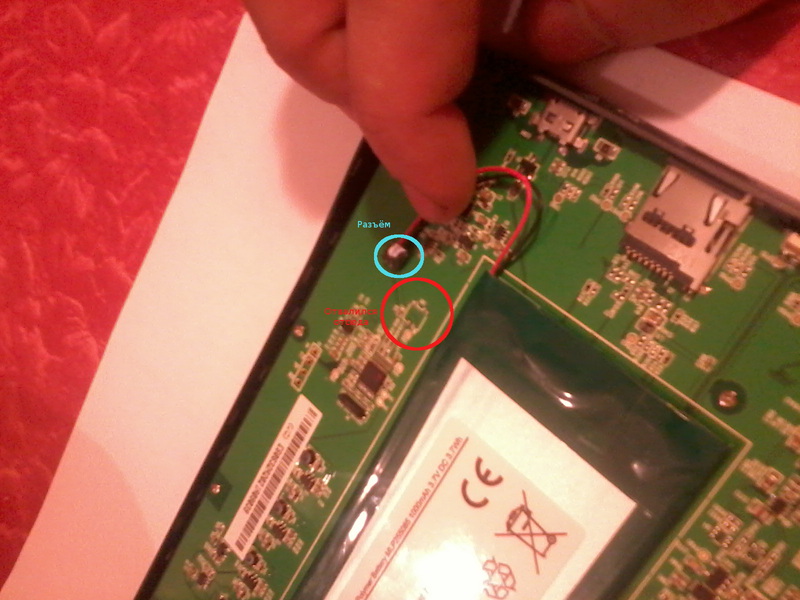
Unfortunately, at the stage of disconnecting the pads from the battery connector, the latter fell off the board with the pads ... I had to get a 25W needle soldering iron and solder it back. However, the main struggle for the book unfolded before soldering the connector, because she behaved beautifully, being connected only to a network power source. Those. the battery (its presence / absence) does not affect the performance of the Pocketbook 611. A valuable observation has been made - the battery connector is not designed for a large number of disconnection-connections3. How exactly does the book not turn on? Does the green light turn on? Both halves of the indicator turn on? What firmware was installed? What firmware was installed before this? What does “unofficial” firmware mean? Where did you get her? What is the serial number of the device?
I described all the information that I knew, to Mikhail, supplementing with a screen photograph with a frozen update process4. Make a memory image (I assume that you have access to the Linux machine)
~ # dd if = / dev / $ YOUR_SD_CARD of = sd_card_dump && sync && sync
just make sure that you specify the path to the device, not the partition, that is . there should be something like / dev / sde (without digits)
for reliability, it’s worth making sure that the entire memory area has been saved, you can verify this:
(in my case, the card is defined as / dev / sde)
mike @ mike-P55A-UD4 : / tmp $ cat / sys / block / sde / size
3862528
mike @ mike-P55A-UD4: / tmp $ expr $ (cat / sys / block / sde / size) \ * 512
1977614336 the
resulting file must be exactly the number 1977614336 (in my case)
In my case (Fedora 17), the dd command was launched through su, and the device was mmcblk0 (a microSD card connected via an adapter to the laptop card reader). In more detail, all actions in the terminal are reflected in the general recovery log5. If possible, please send the first 16 megabytes of the card image, I will try to write them to my device and see what happened there.
# dd if = / dev / $ YOUR_SD_CARD of = sd_dump_16M bs = 1M count = 16 && sync && sync
This item also did not raise any questions; the archive with the image was immediately sent for research6. I took a memory image from my device, try to write it to your card (after you made a backup) and turn on the device with the update buttons held down. The screen should give signs of life. If this happens, try installing the latest official firmware from the site.
here is the link to download dl.dropbox.com/u/2632562/sd_dump.tar.bz2
when you write the image to the card, then use this command
# dd if = sd_dump of = / dev / $ YOUR_SD_CARD bs = 512 seek = 2 && sync && sync
be sure to specify to skip the first 2 blocks, there is a partition table and serial number, they should be saved
After recording the image on the internal memory card and installing it back into the book, the most interesting thing began - it came to life! “As it should”, the backlight of the central joystick button blinked at the first press of the power button, and the update to version 15.8.0 taken from the official Pocketbook website worked properly. The update took no more than 3 minutes, and here is the main menu of the book, until that moment unfamiliar.
It took about 30 minutes more to test all the functions in order to conclude that there was still something wrong with the book: with any attempt to use WiFi (update, connection check), it would hang with different special effects. The connection establishment window that has not been drawn to the end, a black screen, a black window ...
But after another letter to Mikhail, the reason for this behavior became clear, and the reason for the original problem was discovered:
I looked at the image of the card that you sent. The user installed the firmware from 613 (611 plus) to 611. The platforms 613 and 611 are very different in hardware, although they look almost identical in appearance. Firmware 611, on which firmware from 613 was installed, for some reason did not notice a catch and a bootloader from 613 was installed on 611, which cannot work on hardware from 611. I will modify the image of the card you sent, write the “correct” bootloader there and send you to write to the device. The image that I sent you earlier (as I understand it, you managed to start it with it), most likely, does not quite fit your copy of the book, because waveforms differ there (they are unique for each batch of screens) and, perhaps, there are some other bindings to hardware. Within an hour I will prepare a card image and send it to you in the mail.
I could only wait for the image (during this break, I restored the battery connector using the inventory from the title photo of the post):
Attached is an archive with a modified image of the card.
1. write the image to the card with the command
# dd if = sd_dump_16M_modif of = / dev / $ SD_CARD && sync && sync
2. insert the card into the device
3. hold down the update buttons and turn on the device
if everything went fine, the screen should refresh 2 times through black , and the inscription “Firmware update” should appear at the top.
When updating, you can use any available firmware, but it is advisable to use as new as possible.
It would seem that this is the last step to victory, but no! It was after this stage that microSD cards began to glitch shamelessly ... Unread images of updates, file read error when trying to update ... This could only be stopped by formatting the internal memory and external SD card via the device’s interface. Only then the update was successful. In general, there is a feeling that the problem is with the external SD card (Apacer 1Gb, I can’t say from the kit or bought separately)
And only after reformatting and rewriting the official firmware 15.8.0 the update was successful, and WiFi started
End of story, I hope I. Tomorrow I will give the book to the owner
Full chronological log of the terminal: goo.gl/VBCZu
Archive with all the images involved in the restoration:goo.gl/QEL9Z
Thanks again to Mikhail Boyko for the recipe!
PS: Definitely, Pocketbook 611 is much stronger than it seems)
upd ot krovatti : in some cases, the book is turned on by the update buttons + 3-second hold-down reset, and in some by the Power button. Tested on several 611 models. Infa 148%.









