 June 13, 2012 at 10:58
Java: Testing compression algorithms - 16 files, 5 types
Hello "HabraCommunity"!
I post a short review and test results of the main compression algorithms with Java.
To whom it is interesting I ask under kat, to whom not - the request not to minus and to say that the subject is not worthy of a hubr - I will remove in draft copies.
So:
Steria.LZH 100
java.util.zip.GZIP (stream) 1000
java.util.zip.Deflater.BEST_COMPRESSION (block) 1000
java.util.zip.Deflater.BEST_SPEED (block) 1000
java.util.zip.Deflater.HUFFMAN_ONLY (block) 1000
apache.commons.compress.BZIP2 (stream) 10
apache.commons.compress.GZIP (stream) 1000
apache.commons.compress.XZ (stream) 10
com.ning.LZF (block) 1000
com.ning. LZF (stream) 10
QuickLZ (block) 1000
org.xerial.snappy.Snappy (block) 1000
The code is my creation, each has its own style. So I ask CORRECTNESS not to discuss much.
TextDat_1Kb.txt is the plain text of some Wikipedia article.
TextDat_100Kb.txt - a simple text of some Wikipedia articles.
TextDat_1000Kb.txt - a simple text of some Wikipedia articles (English, German, Spanish ..).
PdfDat_200Kb.pdf - the same as * .doc only converted and adjusted size.
PdfDat_1000Kb.pdf - the same as * .doc only converted and adjusted size.
PdfDat_2000Kb.pdf - the same as * .doc only converted and adjusted size.
HtmlDat_10Kb.htm - the text of some documentation without pictures with tags, then formatted html.
HtmlDat_100Kb.htm - the text of some documentation without pictures with tags, then formatted html.
HtmlDat_1000Kb.htm - the text of some documentation without pictures with tags, then formatted html.
ExcelDat_200Kb.xls - packed with random numbers from 0 to 1 by the excel function random ().
ExcelDat_1000Kb.xls - packed with random numbers from 0 to 1 by the excel function random ().
ExcelDat_2000Kb.xls - packed with random numbers from 0 to 1 by the excel function random ().
DocDat_500Kb.doc - texts of articles from Wikipedia with several drawings (English, German, Spanish ..).
DocDat_1000Kb.doc - texts of articles from Wikipedia with several drawings (English, German, Spanish ..).
DocDat_2000Kb.doc - texts of articles from Wikipedia with several drawings (English, German, Spanish ..).
HtmDat_30000Kb.htm - formatted text and tables with numbers.


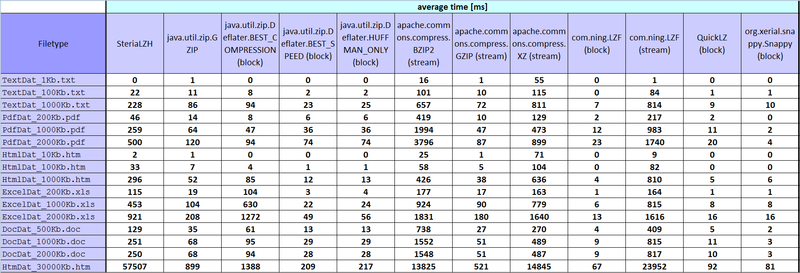


...
I did it right, not right - I hope it is right, but I did! Anyone who has any ideas, ready to criticize! Spread - maybe someone will come in handy.
Some of the results are strange for me, but such numbers turned out in the end, and then entered on the tablet.
I don’t know if it is possible to neatly insert excel tables, so I throw pictures. If someone needs an excel file, I'll upload it without any problems.
PS Thank you for your attention, I'm glad that you read to the end. :)
I post a short review and test results of the main compression algorithms with Java.
To whom it is interesting I ask under kat, to whom not - the request not to minus and to say that the subject is not worthy of a hubr - I will remove in draft copies.
So:
- SteriaLZH is an implementation of the lzh algorithm that is now relevant in the project that the company is working on, and because of which there was a task to find the best alternative.
- not all the algorithms found were tested (implementation of file compression, data). For example, JZip from JCraft, and a few more, everything that I tested is visible on the tablet.
- only compression was tested, decompression was not tested.
- during testing, 5 parameters were calculated: compression rate, min time [ms], average time [ms], median time [ms], max time [ms].
- good compressors ran files 1000 times, not very 10. Below is a plate of what, how much and why.
- stream - implementation (algorithms): accept the file name, then read the file in InputStream accordingly and create (save) it using OutputStream.
- block - implementation (algorithms): we accept the file as byte [], we compress, we get back the compressed byte [].
- During stream compression, the compressed files were deleted before being recreated.
- tested on a working machine lenovo thinkpad T420 (Intel Core i5-2540M, CPU 2.6GHz, 4 GR RAM), WinXP: SP3.
The plate, what and how many times it was run:
Steria.LZH 100
java.util.zip.GZIP (stream) 1000
java.util.zip.Deflater.BEST_COMPRESSION (block) 1000
java.util.zip.Deflater.BEST_SPEED (block) 1000
java.util.zip.Deflater.HUFFMAN_ONLY (block) 1000
apache.commons.compress.BZIP2 (stream) 10
apache.commons.compress.GZIP (stream) 1000
apache.commons.compress.XZ (stream) 10
com.ning.LZF (block) 1000
com.ning. LZF (stream) 10
QuickLZ (block) 1000
org.xerial.snappy.Snappy (block) 1000
This is how measurements were made.
The code is my creation, each has its own style. So I ask CORRECTNESS not to discuss much.
time: for each individual algorithm (implementation) a class was created with a public function that I call and passing it as an argument or path to a file or byte [].
start = System.nanoTime();
byte[] compressedArray = compressor.compressing(arrayToCompress);
end = System.nanoTime();
resultTime = end - start;
start = System.nanoTime();
compressor.compressing(fileToCompress);
end = System.nanoTime();
resultTime = end - start;
Measurement min time [ms], average time [ms], median time [ms], max time [ms]: in ArrayList we got all measured time values of a certain file.
private void minMaxMedianAverCalculation(int element) {
		ResultsSaver resultsSaver = (ResultsSaver) compressorsResults.get(activeTest);
		ArrayList elementsList = new ArrayList();
		for (int i = 0; i < TEST_COUNT; i++) {
			long timeElement = resultsSaver.getNanoSecondsTime(i, element);
			elementsList.add(timeElement);
		}
		Collections.sort(elementsList);
		this.min = (elementsList.get(0)) / 1000000;
		this.max = (elementsList.get(elementsList.size() - 1)) / 1000000;
		int elementsListLength = elementsList.size();
		if (elementsListLength % 2 == 0) {
			int m1 = (elementsListLength - 1) / 2;
			int m2 = m1 + 1;
			this.median = ((elementsList.get(m1) + elementsList.get(m2)) / 2) / 1000000;
		} else {
			int m = elementsListLength / 2;
			this.median =  elementsList.get(m) / 1000000;
		}
		long totalTime = 0;
		for (int i = 0; i < elementsListLength; i++) {
			totalTime += elementsList.get(i);
		}
		this.average = (totalTime / TEST_COUNT)/1000000;
	}
Stream compression rate measurement:
private void setStreamCompressionRatio(String toCompressFileName, String compressedFileName) {
		ResultsSaver resultsSaver = (ResultsSaver) compressorsResults.get(activeTest);
		File fileToCompress = new File(toCompressFileName);
		long fileToCompressSize = fileToCompress.length();
		File compressedFile = new File(compressedFileName);
		long compressedFileSize = compressedFile.length();
		double compressPercent = Math.round(((double) compressedFileSize * 100) / fileToCompressSize * 100) / 100.0d;
		resultsSaver.setCompressionRatio(compressPercent);
	}
Block compression rate measurement:
private void setBlockCompressionRatio(byte[] arrayToCompress, byte[] compressedArray) {
		ResultsSaver resultsSaver = (ResultsSaver) compressorsResults.get(activeTest);
		long arrayToCompressSize = arrayToCompress.length;
		long compressedArraySize = compressedArray.length;
		double compressPercent = Math.round(((double) compressedArraySize * 100) / arrayToCompressSize * 100) / 100.0d;
		resultsSaver.setCompressionRatio(compressPercent);
	}
What was compressed:
TextDat_1Kb.txt is the plain text of some Wikipedia article.
TextDat_100Kb.txt - a simple text of some Wikipedia articles.
TextDat_1000Kb.txt - a simple text of some Wikipedia articles (English, German, Spanish ..).
PdfDat_200Kb.pdf - the same as * .doc only converted and adjusted size.
PdfDat_1000Kb.pdf - the same as * .doc only converted and adjusted size.
PdfDat_2000Kb.pdf - the same as * .doc only converted and adjusted size.
HtmlDat_10Kb.htm - the text of some documentation without pictures with tags, then formatted html.
HtmlDat_100Kb.htm - the text of some documentation without pictures with tags, then formatted html.
HtmlDat_1000Kb.htm - the text of some documentation without pictures with tags, then formatted html.
ExcelDat_200Kb.xls - packed with random numbers from 0 to 1 by the excel function random ().
ExcelDat_1000Kb.xls - packed with random numbers from 0 to 1 by the excel function random ().
ExcelDat_2000Kb.xls - packed with random numbers from 0 to 1 by the excel function random ().
DocDat_500Kb.doc - texts of articles from Wikipedia with several drawings (English, German, Spanish ..).
DocDat_1000Kb.doc - texts of articles from Wikipedia with several drawings (English, German, Spanish ..).
DocDat_2000Kb.doc - texts of articles from Wikipedia with several drawings (English, German, Spanish ..).
HtmDat_30000Kb.htm - formatted text and tables with numbers.
III, results: habrastorage.org - issued such pictures, fully sized 1800 * 615, can anyone know how to make an increase on a click?
...
I did it right, not right - I hope it is right, but I did! Anyone who has any ideas, ready to criticize! Spread - maybe someone will come in handy.
Some of the results are strange for me, but such numbers turned out in the end, and then entered on the tablet.
I don’t know if it is possible to neatly insert excel tables, so I throw pictures. If someone needs an excel file, I'll upload it without any problems.
PS Thank you for your attention, I'm glad that you read to the end. :)









