 July 20, 2017 at 18:14
Wi-Fi adapter via OTG
- From the sandbox
- Tutorial
The idea to switch the network card of the phone to monitor mode was destroyed because of its own naivety and lack of knowledge of the elementary information that the vast majority of mobile network cards do not support this same monitor mode.
The idea of realizing the idea using an external wireless Wi-Fi adapter or a “whistle” that supports the desired monitor mode has collapsed dozens of times due to new and new errors and the loss of faith that this is generally possible, but has grown into this article.
So, how to connect an external Wi-Fi adapter to an Android device or run with obstacles at a distance of “inserted - netcfg wlan0 up”:
It should be available:
- Android phone
- OTG support and OTG itself
- Terminal emulator
- ROOT
FAQ kernel sources - the structure looks like this:Screenshot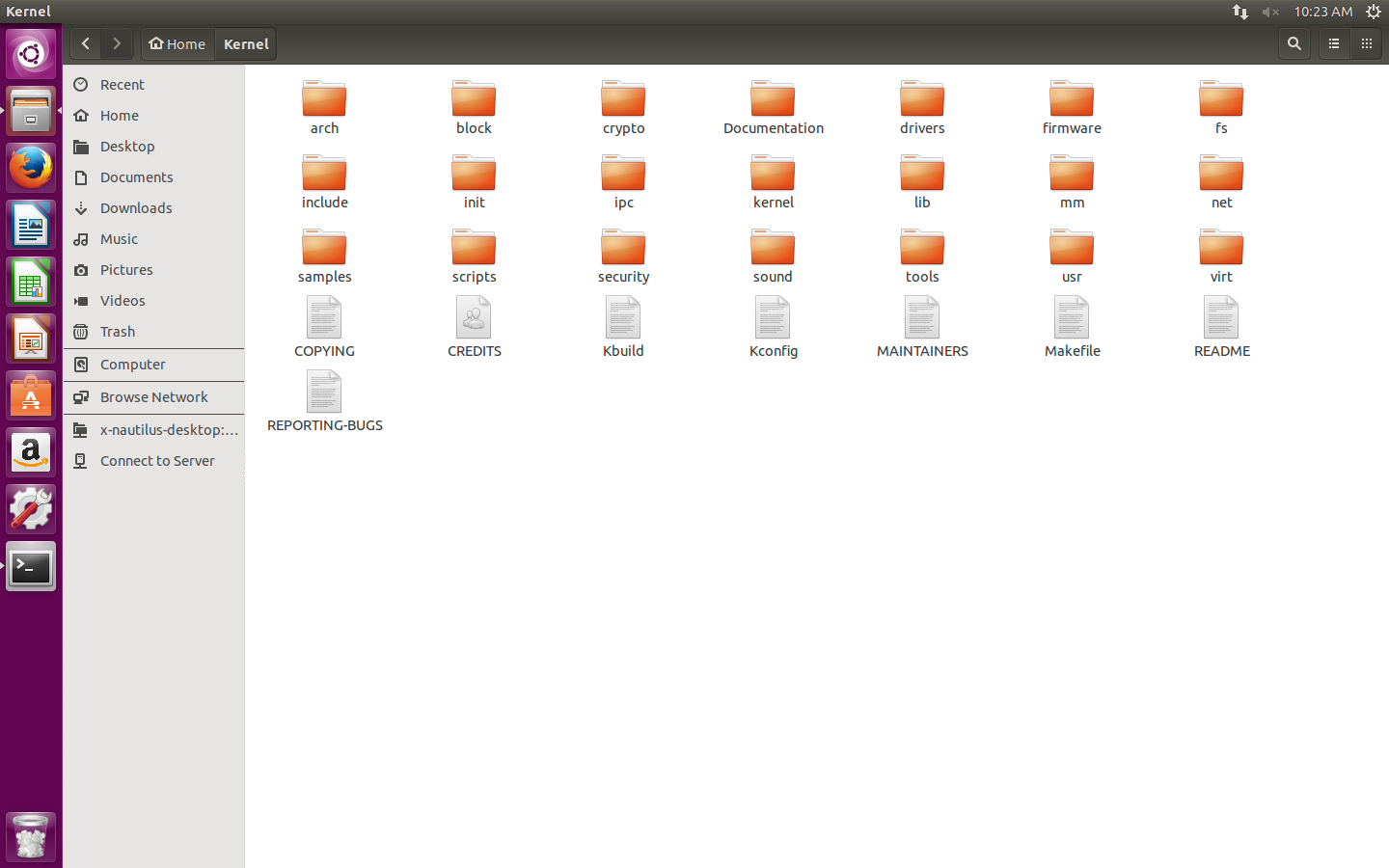
- External Wi-Fi adapter ("whistle")
- Its firmware
- Linux distribution
- ADB (optional, but more convenient)
My case:
- Samsung GT-P5100 Galaxy Tab 2 10.1, Android 4.2.2
- OTG "30-pin - USB"
- Terminal Emulator for Android
- ROOT
- Sources of the stock kernel 3.0.31-1919150 from the Samsung website
- TP-LINK TL-WN722N adapter on AR9271 chipset
- ath9k_htc / htc_9271.fw
- Ubuntu 15.04 distribution in VMware
- android-tools-adb
I'll start. But I ask you to take into account that everything is further considered for the above set and the algorithm is most likely not universal, but the deviations are insignificant .
I. Start
The first step is to get the firmware of your adapter. I insert the adapter into the computer and execute the command
dmesg. I find:...
[ 256.815266] usbcore: registered new interface driver ath9k_htc
...Where the word is to the right of the word driver - the required information. I have it - ath9k_htc . Google for it firmware. Download. I upload the .fw file to the phone in / system / etc / firmware
Then install ADB:
apt-get install android-tools-adbThe third step I download the tool chain (compiler for ARM) from here . There is a large archive, I only need the android-platform_prebuilt-android-sdk-adt_r20-0-ga4062cc.zip \ android-platform_prebuilt-a4062cc \ linux-x86 \ toolchain \ arm-eabi-4.4.3 folder , which I unpack to an arbitrary location .
II. Overclocking
To start, I am writing to the terminal:
export ARCH=arm
export CROSS_COMPILE=~/тот самый произвольный путь/arm-eabi-4.4.3/bin/arm-eabi-
Then in the terminal I go to the directory with the kernel sources downloaded earlier, write
make helpand get a bunch of information, among which I need to find something ending in _defconfig , I have this:...
android_espresso10_omap4430_r02_user_defconfig - Build for android_espresso10_omap4430_r02_user
...Copied, then:
make android_espresso10_omap4430_r02_user_defconfigAnd at the end, I launch the graphical kernel configuration:
make menuconfigThe following window appears:
Screenshot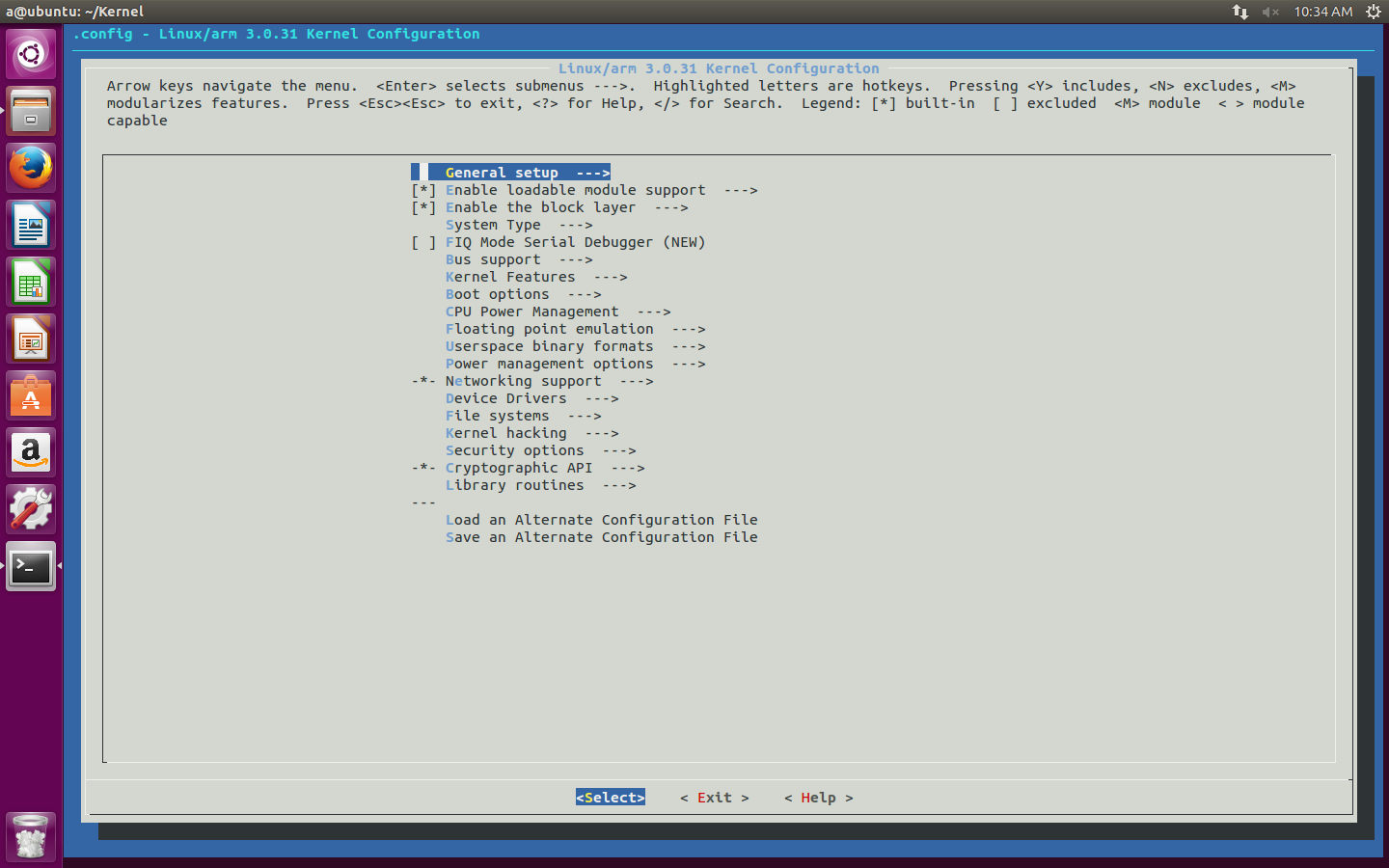
I am moving along the routes:
- Networking support → Wireless I
go down to the Generic IEEE 802.11 Networking stack (mac80211) and click on the space bar, watching the appearance of the M icon in front of this item - Device Drivers -> Network device support → Wireless LAN
I put M in my chipset, in my case - Atheros Wireless Cards
Then I go to this section itself and inside I mark with the same space and the M sign the item I need.Screenshot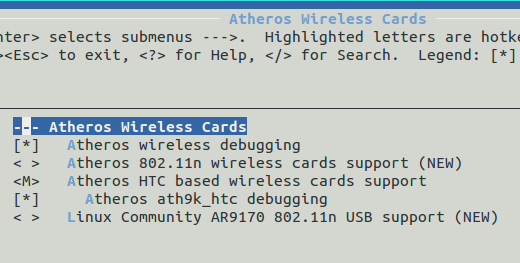
- Exit → Do you wish to save your new configuration? → Yes
Next, I go into the folder with the kernel sources and open the Makefile . I find the line CFLAGS_MODULE = and append -fno-pic there so that it turns out:
CFLAGS_MODULE = -fno-picI keep it. I’m returning to the terminal, and if you closed it, then to the directory with the sources too, and execute it first
make modules_prepare, and then simply make. The result will require waiting. My final set:MODPOST 8 modules
CC drivers/net/wireless/ath/ath.mod.o
LD [M] drivers/net/wireless/ath/ath.ko
CC drivers/net/wireless/ath/ath9k/ath9k_common.mod.o
LD [M] drivers/net/wireless/ath/ath9k/ath9k_common.ko
CC drivers/net/wireless/ath/ath9k/ath9k_htc.mod.o
LD [M] drivers/net/wireless/ath/ath9k/ath9k_htc.ko
CC drivers/net/wireless/ath/ath9k/ath9k_hw.mod.o
LD [M] drivers/net/wireless/ath/ath9k/ath9k_hw.ko
CC drivers/net/wireless/bcmdhd/dhd.mod.o
LD [M] drivers/net/wireless/bcmdhd/dhd.ko
CC drivers/scsi/scsi_wait_scan.mod.o
LD [M] drivers/scsi/scsi_wait_scan.ko
CC net/mac80211/mac80211.mod.o
LD [M] net/mac80211/mac80211.ko
CC net/wireless/cfg80211.mod.o
LD [M] net/wireless/cfg80211.ko
You will need modules (.ko files) that include the word ath and mac80211.ko . Transferring them to the phone.
You can use adb, working through a computer, or you can not use and work through the phone terminal, typing commands with your fingers on the screen. I chose adb.
Let me remind you how it works. I connect the phone via USB (debugging, of course, is turned on) and execute: I'm on the phone and under root. I look at which modules are already a command and unload them all, if possible, with a command. Then I go to the directory with the above modules: You can verify that they are available with the command .
adb start-server

adb shell

sulsmodrmmod имямодуляcd /sdcard/ваш путь/lsa@ubuntu:~/Kernel$ adb start-server
* daemon not running. starting it now on port 5037 *
* daemon started successfully *
a@ubuntu:~/Kernel$ adb shell
shell@android:/ $ su
root@android:/ # cd /sdcard/temp
root@android:/sdcard/temp # ls
ath.ko
ath9k_common.ko
ath9k_htc.ko
ath9k_hw.ko
mac80211.ko
insmod имямодуляI load
them with a command in this and only such sequence (otherwise it just won’t boot, giving an error): ath.ko
ath9k_hw.ko
ath9k_common.ko
mac80211.ko
ath9k_htc.ko
III. Obstacles
This is all the salt, without which the article would be too simple.
1. Versions
Naturally, the first error occurs at the first stage.
insmod ath.koinsmod: init_module 'ath.ko' failed (Exec format error)I look what the kernel message buffer will say about this by running the command
dmesg:... ath: version magic '3.0.31 SMP preempt mod_unload modversions ARMv7 p2v8' should be '3.0.31-1919150 SMP preempt mod_unload modversions ARMv7 p2v8'Versions do not match. 3.0.31 is not 3.0.31-1919150 .
Solution: I
open the same Makefile in the kernel sources and at the very top of the file I find:
VERSION = 3I append to EXTRAVERSION = the missing piece of version -1919150 so that it turns out:
PATCHLEVEL = 0
SUBLEVEL = 31
EXTRAVERSION =
NAME = Sneaky Weasel
VERSION = 3And save.
PATCHLEVEL = 0
SUBLEVEL = 31
EXTRAVERSION = -1919150
NAME = Sneaky Weasel
The final stage will take place in the / include / config directory , where in the kernel.release file I will change 3.0.31 to 3.0.31-1919150
again
make modules_prepare, makeand then on to the previous point.2. ewma
When downloading mac80211.ko , I again have an error, which the
dmesgfollowing will say:<4>[ 3491.160949] C1 [ insmod] mac80211: Unknown symbol ewma_add (err 0)
<4>[ 3491.161865] C1 [ insmod] mac80211: Unknown symbol ewma_init (err 0)
Solution:
By a miracle, after reading a dangerous but the only “solution” on one of the English forums, I go to / net / mac80211 / and the rx.c and sta_info.c files and just delete [or comment on (//)] the lines ewma_add (& sta-> avg_signal, -status-> signal); and ewma_init (& sta-> avg_signal, 1024, 8); respectively.
Screenshots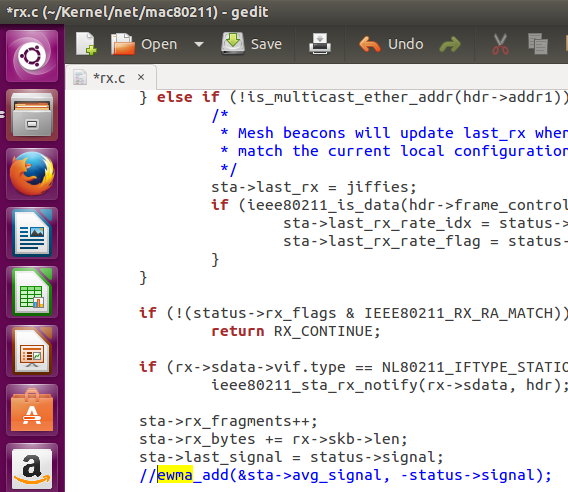

Again recompile the modules and move on.
3. LED
When loading ath9k_htc.ko and mac80211.ko, there are regular errors, for mac80211.ko it is:
dmesg
<4>[ 2435.271636] C1 [         insmod] mac80211: Unknown symbol led_trigger_unregister (err 0)
<4>[ 2435.271820] C1 [         insmod] mac80211: Unknown symbol led_brightness_set (err 0)
<4>[ 2435.271972] C1 [         insmod] mac80211: Unknown symbol led_blink_set (err 0)
<4>[ 2435.272033] C1 [         insmod] mac80211: Unknown symbol led_trigger_register (err 0)
<4>[ 2435.272155] C1 [         insmod] mac80211: Unknown symbol led_trigger_event (err 0)
And ath9k_htc.ko has this:
dmesg
<4>[ 2709.396392] C1 [         insmod] ath9k_htc: Unknown symbol ieee80211_start_tx_ba_cb_irqsafe (err 0)
<4>[ 2709.396972] C1 [         insmod] ath9k_htc: Unknown symbol ieee80211_free_hw (err 0)
<4>[ 2709.397155] C1 [         insmod] ath9k_htc: Unknown symbol ieee80211_alloc_hw (err 0)
<4>[ 2709.397216] C1 [         insmod] ath9k_htc: Unknown symbol ieee80211_start_tx_ba_session (err 0)
<4>[ 2709.397369] C1 [         insmod] ath9k_htc: Unknown symbol ieee80211_register_hw (err 0)
<4>[ 2709.397430] C1 [         insmod] ath9k_htc: Unknown symbol led_classdev_unregister (err 0)
<4>[ 2709.397491] C1 [         insmod] ath9k_htc: Unknown symbol __ieee80211_create_tpt_led_trigger (err 0)
<4>[ 2709.397766] C1 [         insmod] ath9k_htc: Unknown symbol ieee80211_get_buffered_bc (err 0)
<4>[ 2709.397827] C1 [         insmod] ath9k_htc: Unknown symbol ieee80211_find_sta (err 0)
<4>[ 2709.398284] C1 [         insmod] ath9k_htc: Unknown symbol ieee80211_stop_tx_ba_cb_irqsafe (err 0)
<4>[ 2709.398376] C1 [         insmod] ath9k_htc: Unknown symbol wiphy_to_ieee80211_hw (err 0)
<4>[ 2709.398498] C1 [         insmod] ath9k_htc: Unknown symbol ieee80211_queue_delayed_work (err 0)
<4>[ 2709.398712] C1 [         insmod] ath9k_htc: Unknown symbol ieee80211_rx (err 0)
<4>[ 2709.398895] C1 [         insmod] ath9k_htc: Unknown symbol ieee80211_wake_queues (err 0)
<4>[ 2709.399230] C1 [         insmod] ath9k_htc: Unknown symbol ieee80211_tx_status (err 0)
<4>[ 2709.399291] C1 [         insmod] ath9k_htc: Unknown symbol ieee80211_stop_queues (err 0)
<4>[ 2709.399505] C1 [         insmod] ath9k_htc: Unknown symbol ieee80211_iterate_active_interfaces_atomic (err 0)
<4>[ 2709.399597] C1 [         insmod] ath9k_htc: Unknown symbol ieee80211_unregister_hw (err 0)
<4>[ 2709.399749] C1 [         insmod] ath9k_htc: Unknown symbol ieee80211_beacon_get_tim (err 0)
<4>[ 2709.399871] C1 [         insmod] ath9k_htc: Unknown symbol led_classdev_register (err 0)
<4>[ 2709.399932] C1 [         insmod] ath9k_htc: Unknown symbol ieee80211_queue_work (err 0)
If the ieee80211_ error from ath9k_htc.ko is because I'm trying to download it to mac80211.ko , then the led_ error from both modules is because the phone does not understand what to do with the LED on my adapter. There are two options for the development of events.
The first one simply removes the [*] icon in the graphical kernel configuration opposite
Networking support → Wireless → Enable LED triggers and Device Drivers → LED Support .
And in the second, this same icon is frozen and you can’t remove it. This means that when choosing my adapter, the “support” of the LED is automatically selected, which cannot be removed. Of course, this is my case:
Screenshots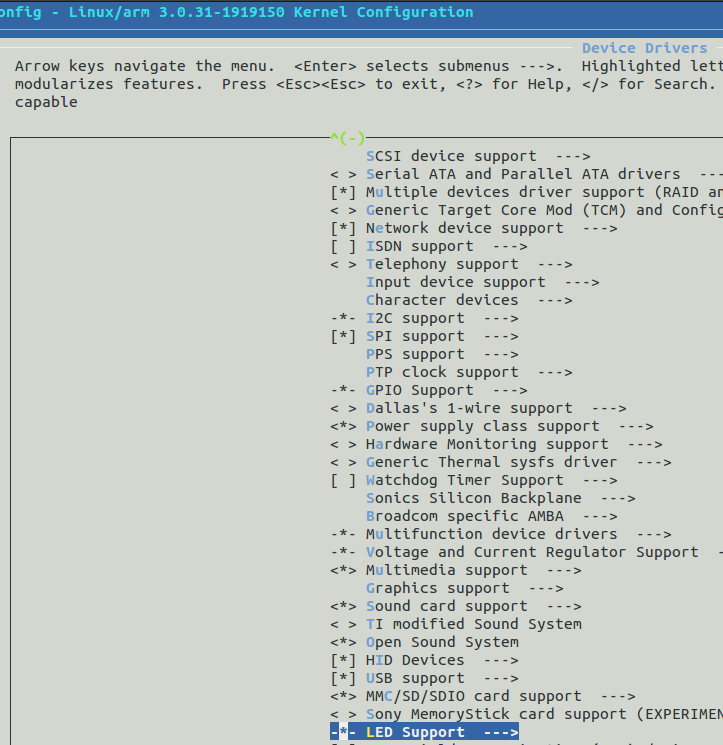
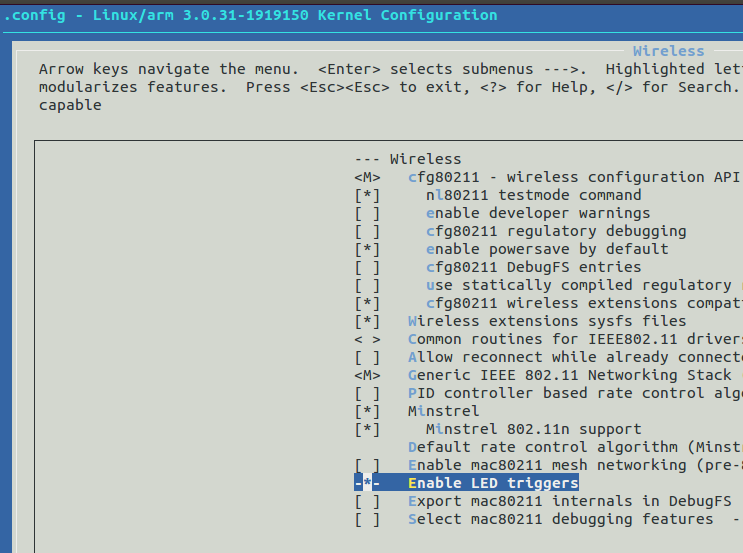
Solution:
The Help button for Device Drivers → LED Support displays the following section information:
Screenshot
I'm interested in:
Defined at drivers / leds / KconfigSo all settings are stored in this file. For a long time I tortured Kconfig in / drivers / leds / until I thought of looking at the same file in my / drivers / net / wireless / ath / ath9k , where I found the answer to my question:
...Immediately delete the lines that include the scary word LED , get
config ATH9K_HTC
tristate "Atheros HTC based wireless cards support"
depends on USB && MAC80211
select ATH9K_HW
select MAC80211_LEDS
select LEDS_CLASS
select NEW_LEDS
select ATH9K_COMMON
...
...and save. Now you can uncheck:
config ATH9K_HTC
tristate "Atheros HTC based wireless cards support"
depends on USB && MAC80211
select ATH9K_HW
select ATH9K_COMMON
...
Screenshots
Here the point completely disappeared:

Here the point completely disappeared:
Again and again recompilation, new modules, etc.
Voila. All modules are loaded. Turn off Wi-Fi on the phone and connect the adapter. But the LED on it, as you might have guessed, will not work. It is not necessary.
4. Firmware version
If all the necessary modules have loaded, but after connecting the adapter to the phone, you do not see anything new in the output of the command
netcfg, then the same comes to the rescue dmesg....
[7582.477874] C0 [khubd] ath9k_htc 1-1: 1.0: ath9k_htc: Please upgrade to FW version 1.3
...
Screenshot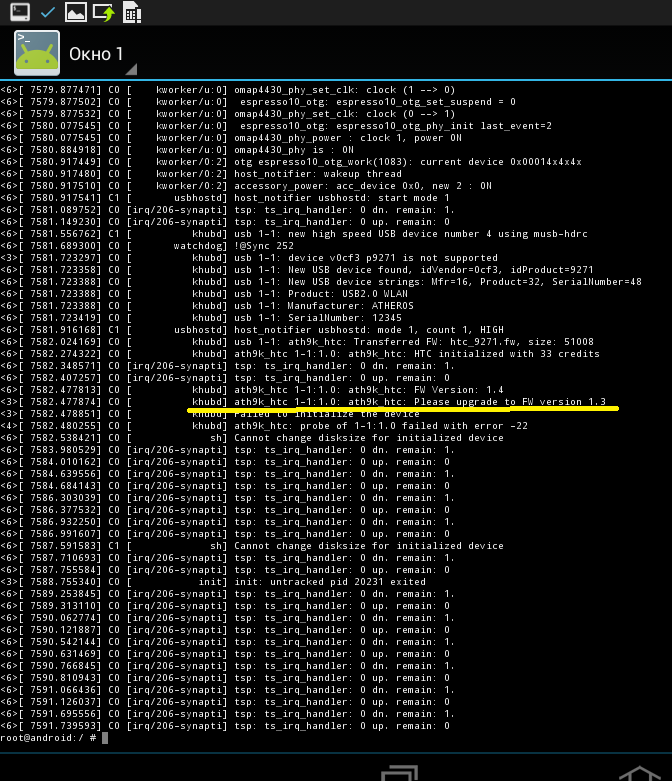
Solution:
Just download another firmware, but the required version, and put it instead of the past.
IV. Finish
Now there should be no problems. I turn off my native Wi-Fi, all modules are loaded, the firmware version is needed. I insert the adapter and netcfg brings happiness for the first time. I set the monitor mode for the appeared network interface and raise it. Success!

Native wifi off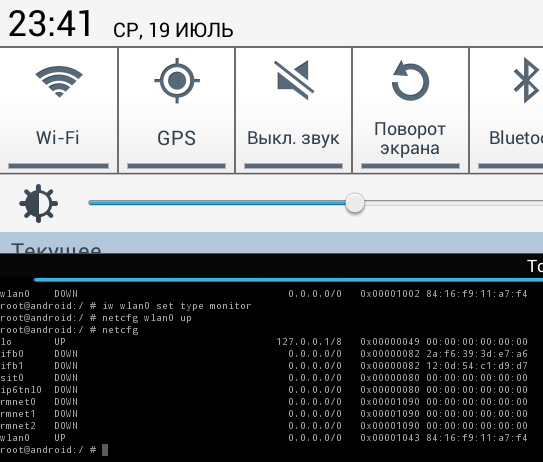
Well, how and why the monitor mode is often used, you already know everything. Thanks for attention!
Aircrack via OTG










