
 May 9, 2017 at 19:08
Making Space Invaders on Love2d and Lua
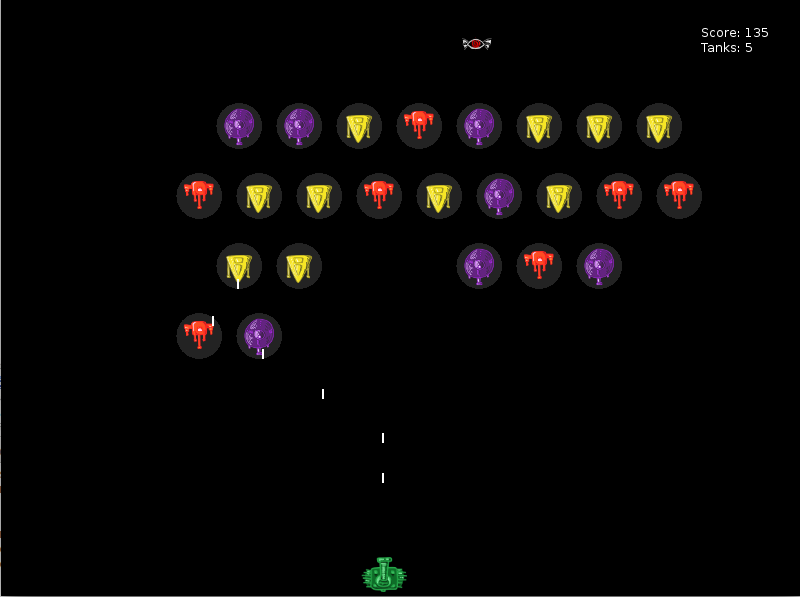
Good afternoon! Today we will make the classic game Space Invaders on the Love2d engine . For fans of the "code right away" the final version of the game can be viewed on the github . Those who are interested in the development process, welcome to cat.
Here I can’t describe everything that is in the final version, it’s not interesting and will make the article endless. I can say that in addition to what I will analyze here, the game contains different modes (pause, lose, win), it can display debugging information (speed and number of objects, memory, etc.), the Player has lives and an account is kept, there are different game levels (not complexity, but sequence). All this can either be seen in the code, or develop your own options.
So, the work plan:
Training
In main.lua, add the calls to the main love2d methods. Each element or function that we will do subsequently must be directly or indirectly related to these methods, otherwise they will go unnoticed.
function love.load()
end
function love.keyreleased( key )
end
function love.draw()
end
function love.update( dt )
end
Add player
Add player.lua file to the project root
local player = {}
player.position_x = 500
player.position_y = 550
player.speed_x = 300
player.width = 50
player.height = 50
function player.update( dt )
    if love.keyboard.isDown( "right" ) and
            player.position_x < ( love.graphics.getWidth() - player.width ) then
        player.position_x = player.position_x + ( player.speed_x * dt )
    end
    if love.keyboard.isDown( "left" )  and player.position_x > 0 then
        player.position_x = player.position_x - ( player.speed_x * dt )
    end
end
function player.draw()
    love.graphics.rectangle(
                       "fill",
                       player.position_x,
                       player.position_y,
                       player.width,
                       player.height
                 )
end
return player
And also update main.lua
local player = require 'player'
function love.draw()
        player.draw()
end
function love.update( dt )
        player.update( dt )
end
If you start the game, we will see a black screen with a white square at the bottom, which can be controlled by the keys "left" and "right". And he can’t go beyond the screen due to restrictions in the Player’s code:
player.position.x < ( love.graphics.getWidth() - player.width )
player.position.x > 0
Add enemies
Since we will fight against foreign invaders, we will call the file with them invaders.lua :
local invaders = {}
invaders.rows = 5
invaders.columns = 9
invaders.top_left_position_x = 50
invaders.top_left_position_y = 50
invaders.invader_width = 40
invaders.invader_height = 40
invaders.horizontal_distance = 20
invaders.vertical_distance = 30
invaders.current_speed_x = 50
invaders.current_level_invaders = {}
local initial_speed_x = 50
local initial_direction = 'right'
function invaders.new_invader( position_x, position_y )
    return { position_x = position_x,
                 position_y = position_y,
                 width = invaders.invader_width,
                 height = invaders.invader_height }
end
function invaders.new_row( row_index )
    local row = {}
    for col_index=1, invaders.columns - (row_index % 2) do
        local new_invader_position_x = invaders.top_left_position_x + invaders.invader_width * (row_index % 2) + (col_index - 1) * (invaders.invader_width + invaders.horizontal_distance)
        local new_invader_position_y = invaders.top_left_position_y + (row_index - 1) * (invaders.invader_height + invaders.vertical_distance)
        local new_invader = invaders.new_invader( new_invader_position_x, new_invader_position_y )
        table.insert( row, new_invader )
    end
    return row
end
function invaders.construct_level()
    invaders.current_speed_x = initial_speed_x
    for row_index=1, invaders.rows do
        local invaders_row = invaders.new_row( row_index )
        table.insert( invaders.current_level_invaders, invaders_row )
    end
end
function invaders.draw_invader( single_invader )
    love.graphics.rectangle('line',
                       single_invader.position_x,
                       single_invader.position_y,
                       single_invader.width,
                       single_invader.height )
end
function invaders.draw()
    for _, invader_row in pairs( invaders.current_level_invaders ) do
        for _, invader in pairs( invader_row ) do
            invaders.draw_invader( invader, is_miniboss )
        end
    end
end
function invaders.update_invader( dt, single_invader )
    single_invader.position_x = single_invader.position_x + invaders.current_speed_x * dt
end
function invaders.update( dt )
    local invaders_rows = 0
    for _, invader_row in pairs( invaders.current_level_invaders ) do
        invaders_rows = invaders_rows + 1
    end
    if invaders_rows == 0 then
        invaders.no_more_invaders = true
    else
        for _, invader_row in pairs( invaders.current_level_invaders ) do
            for _, invader in pairs( invader_row ) do
                invaders.update_invader( dt, invader )
            end
        end
    end
end
return invaders
Update main.lua
...
local invaders = require 'invaders'
function love.load()
        invaders.construct_level()
end
function love.draw()
        ...
        invaders.draw()
end
function love.update( dt )
        ...
        invaders.update( dt )
end
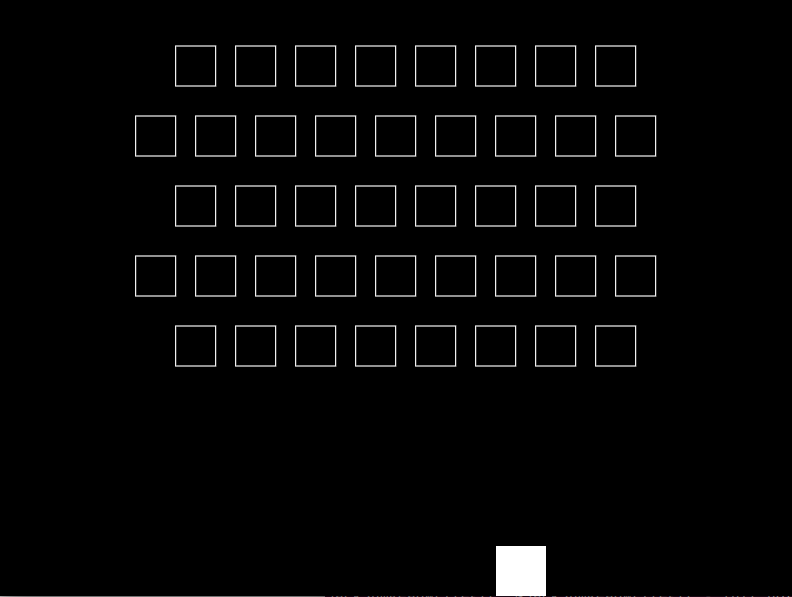
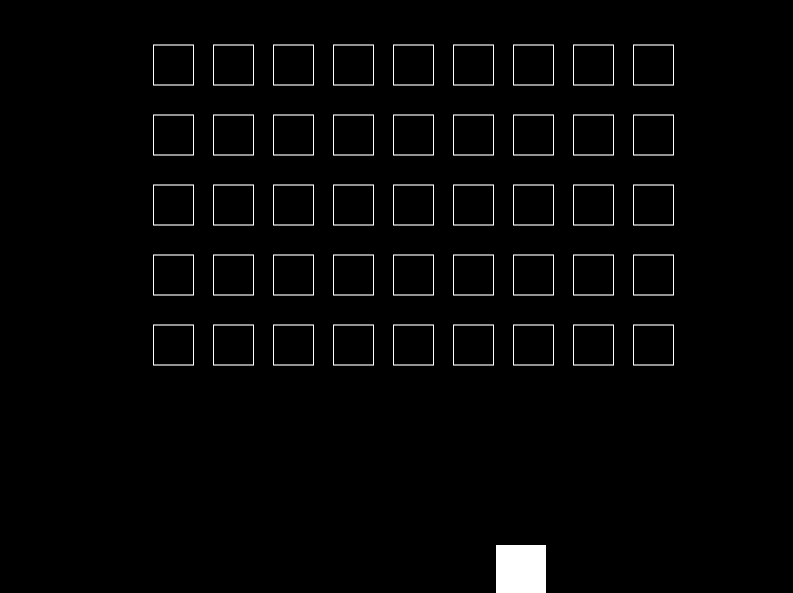
love.load is called at the very beginning of the application. It calls the invaders.construct_level method , which creates the invaders.current_level_invaders table and populates it row by column with separate invader objects , taking into account the height and width of the objects, as well as the required horizontal and vertical distance between them. I had to complicate the invaders.new_row method a bit to get even and odd rows offset. If replacing the current design:
for col_index=1, invaders.columns - (row_index % 2) do
    local new_invader_position_x = invaders.top_left_position_x + invaders.invader_width * (row_index % 2) + (col_index - 1) * (invaders.invader_width + invaders.horizontal_distance)
like this:
for col_index=1, invaders.columns do
    local new_invader_position_x = invaders.top_left_position_x + (col_index - 1) * (invaders.invader_width + invaders.horizontal_distance)
then we remove this effect and return the rectangular filling. Comparison in Pictures
| Current option | Rectangular option |
|---|---|
 |  |
The invader object is a table with the properties: position_x, position_y, width, height. All this is required to draw an object, and later it will also be required to check for collisions with shots.
love.draw calls invaders.draw and all objects in all rows of the invaders.current_level_invaders table are drawn .
love.update , and then invaders.update update the current position of each invader, taking into account the current speed, which so far is only one - the original.
The invaders have already begun to move, but so far only to the right, behind the screen. We will fix it now.
Add walls and collisions
New walls.lua file
local walls = {}
walls.wall_thickness = 1
walls.bottom_height_gap = 1/5 * love.graphics.getHeight()
walls.current_level_walls = {}
function walls.new_wall( position_x, position_y, width, height )
    return { position_x = position_x,
             position_y = position_y,
             width = width,
             height = height }
end
function walls.construct_level()
    local left_wall = walls.new_wall( 0,
                                      0,
                                      walls.wall_thickness,
                                      love.graphics.getHeight() - walls.bottom_height_gap
                                )
    local right_wall = walls.new_wall( love.graphics.getWidth() - walls.wall_thickness,
                                       0,
                                       walls.wall_thickness,
                                       love.graphics.getHeight() - walls.bottom_height_gap
                                )
    local top_wall = walls.new_wall( 0,
                                     0,
                                     love.graphics.getWidth(),
                                     walls.wall_thickness
                                )
    local bottom_wall = walls.new_wall( 0,
                                love.graphics.getHeight() - walls.bottom_height_gap - walls.wall_thickness,
                                love.graphics.getWidth(),
                                walls.wall_thickness
                                )
    walls.current_level_walls["left"] = left_wall
    walls.current_level_walls["right"] = right_wall
    walls.current_level_walls["top"] = top_wall
    walls.current_level_walls["bottom"] = bottom_wall
end
function walls.draw_wall(wall)
    love.graphics.rectangle( 'line',
                             wall.position_x,
                             wall.position_y,
                             wall.width,
                             wall.height
                        )
end
function walls.draw()
    for _, wall in pairs( walls.current_level_walls ) do
        walls.draw_wall( wall )
    end
end
return walls
And a little in main.lua
...
local walls    = require 'walls'
function love.load()
    ...
    walls.construct_level()
end
function love.draw()
    ...
    -- walls.draw()
end
Similarly to creating invaders, walls.construct_level is responsible for creating walls . We only need walls to intercept the “collisions” of invaders and shots with them, so we do not need to draw them. But this may be needed for debugging purposes, so the Walls object has a draw method, the call of which comes standard from main.lua -> love.draw , but so far no debugging is needed - it (the call) is commented out.
Now we’ll write a collision handler that I borrowed from here . So collisions.lua
local collisions = {}
function collisions.check_rectangles_overlap( a, b )
    local overlap = false
    if not( a.x + a.width < b.x or b.x + b.width < a.x or
            a.y + a.height < b.y or b.y + b.height < a.y ) then
        overlap = true
    end
    return overlap
end
function collisions.invaders_walls_collision( invaders, walls )
    local overlap, wall
    if invaders.current_speed_x > 0 then
        wall, wall_type = walls.current_level_walls['right'], 'right'
    else
        wall, wall_type = walls.current_level_walls['left'], 'left'
    end
    local a = { x = wall.position_x,
                y = wall.position_y,
                width = wall.width,
                height = wall.height }
    for _, invader_row in pairs( invaders.current_level_invaders ) do
        for _, invader in pairs( invader_row ) do
            local b = { x = invader.position_x,
                        y = invader.position_y,
                        width = invader.width,
                        height = invader.height }
            overlap = collisions.check_rectangles_overlap( a, b )
            if overlap then
                if wall_type == invaders.allow_overlap_direction then
                    invaders.current_speed_x = -invaders.current_speed_x
                    if invaders.allow_overlap_direction == 'right' then
                        invaders.allow_overlap_direction = 'left'
                    else
                        invaders.allow_overlap_direction = 'right'
                    end
                    invaders.descend_by_row()
                end
            end
        end
    end
end
function collisions.resolve_collisions( invaders, walls )
    collisions.invaders_walls_collision( invaders, walls )
end
return collisions
Add a couple of methods and a variable to invaders.lua
invaders.allow_overlap_direction = 'right'
function invaders.descend_by_row_invader( single_invader )
    single_invader.position_y = single_invader.position_y + invaders.vertical_distance / 2
end
function invaders.descend_by_row()
    for _, invader_row in pairs( invaders.current_level_invaders ) do
        for _, invader in pairs( invader_row ) do
            invaders.descend_by_row_invader( invader )
        end
    end
end
And add a collision check to main.lua
local collisions = require 'collisions'
function love.update( dt )
    ...
    collisions.resolve_collisions( invaders, walls )
end
Now the invaders come across a wall of collisions.invaders_walls_collision and go down a little lower, and also change the speed to the opposite.
I had to introduce an additional check for equality of the type of the wall that the invaders came across and the variable in which the valid type is stored:
if overlap then
    if wall_type == invaders.allow_overlap_direction then
    ...
due to the fact that all the invaders come across the wall simultaneously from the extreme column and the collision handler manages to “work for everyone” and reduce the entire team by one row, before the invaders turn around and leave the contacts, as a result, the armada descended immediately to several rows. Here, either to put some block in the event of a collision in the next collision, or to place the invaders not exactly one under the other, either as done, or somehow else.
It's time for the player to learn how to shoot
New file and class bullets.lua
local bullets = {}
bullets.current_speed_y = -200
bullets.width = 2
bullets.height = 10
bullets.current_level_bullets = {}
function bullets.destroy_bullet( bullet_i )
    bullets.current_level_bullets[bullet_i] = nil
end
function bullets.new_bullet(position_x, position_y)
    return { position_x = position_x,
             position_y = position_y,
             width = bullets.width,
             height = bullets.height }
end
function bullets.fire( player )
    local position_x = player.position_x + player.width / 2
    local position_y = player.position_y
    local new_bullet = bullets.new_bullet( position_x, position_y )
    table.insert(bullets.current_level_bullets, new_bullet)
end
function bullets.draw_bullet( bullet )
    love.graphics.rectangle( 'fill',
                             bullet.position_x,
                             bullet.position_y,
                             bullet.width,
                             bullet.height
                        )
end
function bullets.draw()
    for _, bullet in pairs(bullets.current_level_bullets) do
        bullets.draw_bullet( bullet )
    end
end
function bullets.update_bullet( dt, bullet )
    bullet.position_y = bullet.position_y + bullets.current_speed_y * dt
end
function bullets.update( dt )
    for _, bullet in pairs(bullets.current_level_bullets) do
        bullets.update_bullet( dt, bullet )
    end
end
return bullets
Here the main method is bullets.fire . We pass the Player into it, because we want the bullet to fly out of it, which means we need to know its location. Because we have not one cartridge, but a whole queue is possible, then we store it in the table bullets.current_level_bullets , we call the draw and update methods for it and each cartridge . The bullets.destroy_bullet method is needed to remove excess cartridges from memory when it comes into contact with an invader or ceiling.
Add collision processing for the bullet-invader and the bullet-ceiling.
collisions.lua
function collisions.invaders_bullets_collision( invaders, bullets )
    local overlap
    for b_i, bullet in pairs( bullets.current_level_bullets) do
        local a = { x = bullet.position_x,
                    y = bullet.position_y,
                    width = bullet.width,
                    height = bullet.height }
        for i_i, invader_row in pairs( invaders.current_level_invaders ) do
            for i_j, invader in pairs( invader_row ) do
                local b = { x = invader.position_x,
                            y = invader.position_y,
                            width = invader.width,
                            height = invader.height }
                overlap = collisions.check_rectangles_overlap( a, b )
                if overlap then
                    invaders.destroy_invader( i_i, i_j )
                    bullets.destroy_bullet( b_i )
                end
            end
        end
    end
end
function collisions.bullets_walls_collision( bullets, walls )
    local overlap
    local wall = walls.current_level_walls['top']
    local a = { x = wall.position_x,
                y = wall.position_y,
                width = wall.width,
                height = wall.height }
    for b_i, bullet in pairs( bullets.current_level_bullets) do
        local b = { x = bullet.position_x,
                    y = bullet.position_y,
                    width = bullet.width,
                    height = bullet.height }
        overlap = collisions.check_rectangles_overlap( a, b )
        if overlap then
            bullets.destroy_bullet( b_i )
        end
    end
end
function collisions.resolve_collisions( invaders, walls, bullets )
    ...
    collisions.invaders_bullets_collision( invaders, bullets )
    collisions.bullets_walls_collision( bullets, walls )
end
We will add a method to the invaders to destroy it, as well as to check for the presence of invaders in a specific row in the general invader table - if no one is left, then the row itself is deleted. And also increase the speed of the entire armada during the kill.
invaders.lua
...
invaders.speed_x_increase_on_destroying = 10
function invaders.destroy_invader( row, invader )
    invaders.current_level_invaders[row][invader] = nil
    local invaders_row_count = 0
    for _, invader in pairs( invaders.current_level_invaders[row] ) do
        invaders_row_count = invaders_row_count + 1
    end
    if invaders_row_count == 0 then
        invaders.current_level_invaders[row] = nil
    end
    if invaders.allow_overlap_direction == 'right' then
        invaders.current_speed_x = invaders.current_speed_x + invaders.speed_x_increase_on_destroying
    else
        invaders.current_speed_x = invaders.current_speed_x - invaders.speed_x_increase_on_destroying
    end
 end
...
And we update mail.lua : we add a new class, send it to the collision handler, and hang up the shooting call on the Space key.
...
local bullets    = require 'bullets'
function love.keyreleased( key )
    if key == 'space' then
        bullets.fire( player )
    end
end
function love.draw()
    ...
    bullets.draw()
end
function love.update( dt )
    ...
    collisions.resolve_collisions( invaders, walls, bullets )
    bullets.update( dt )
end
Further work involves modifying the existing code, so what we have at this stage is saved as version 0.5 .
NB The code in the git differs from the one parsed here. The hump library was originally used for working with vectors. But then it became clear that it was possible to do without it, and in the final version sawed out the library. The code is equally working here and there, the only thing is that you will have to initialize submodules to run the code from the github:
git submodule update --init
Hang textures

These are three standard enemies, plus one mini-boss, whose device will not be considered here, but it is in the final version . And the tank player himself.
Textures for the game were kindly provided by annnushkkka .
All images will be in the images directory in the root of the project. Changing the Player in player.lua
...
player.image = love.graphics.newImage('images/Hero.png')
-- from https://love2d.org/forums/viewtopic.php?t=79756
function getImageScaleForNewDimensions( image, newWidth, newHeight )
    local currentWidth, currentHeight = image:getDimensions()
    return ( newWidth / currentWidth ), ( newHeight / currentHeight )
end
local scaleX, scaleY = getImageScaleForNewDimensions( player.image, player.width, player.height )
function player.draw()  -- меняем полностью
    love.graphics.draw(player.image,
                       player.position_x,
                       player.position_y, rotation, scaleX, scaleY )
end
...
The getImageScaleForNewDimensions function, seen from here , adjusts the image to the sizes we specified in player.width, player.height . It is used both here and for enemies, later we will place it in a separate module utils.lua . The player.draw function is replaced.
At launch, the former square player is now a tank!
We change enemies invaders.lua
...
invaders.images = {love.graphics.newImage('images/bad_1.png'),
                   love.graphics.newImage('images/bad_2.png'),
                   love.graphics.newImage('images/bad_3.png')
            }
-- from https://love2d.org/forums/viewtopic.php?t=79756
function getImageScaleForNewDimensions( image, newWidth, newHeight )
    local currentWidth, currentHeight = image:getDimensions()
    return ( newWidth / currentWidth ), ( newHeight / currentHeight )
end
local scaleX, scaleY = getImageScaleForNewDimensions( invaders.images[1], invaders.invader_width,
    invaders.invader_height )
function invaders.new_invader(position_x, position_y ) -- меняем
    local invader_image_no = math.random(1, #invaders.images)
    invader_image = invaders.images[invader_image_no]
    return ({position_x = position_x,
             position_y = position_y,
             width = invaders.invader_width,
             height = invaders.invader_height,
             image = invader_image})
end
function invaders.draw_invader( single_invader ) -- меняем
    love.graphics.draw(single_invader.image,
                       single_invader.position_x,
                       single_invader.position_y, rotation, scaleX, scaleY )
end
We add pictures of enemies in the table and adjust the sizes through getImageScaleForNewDimensions. When creating a new invader, a random image from our image table is assigned to it in the image attribute. And we change the rendering method itself.
Here's what happened:
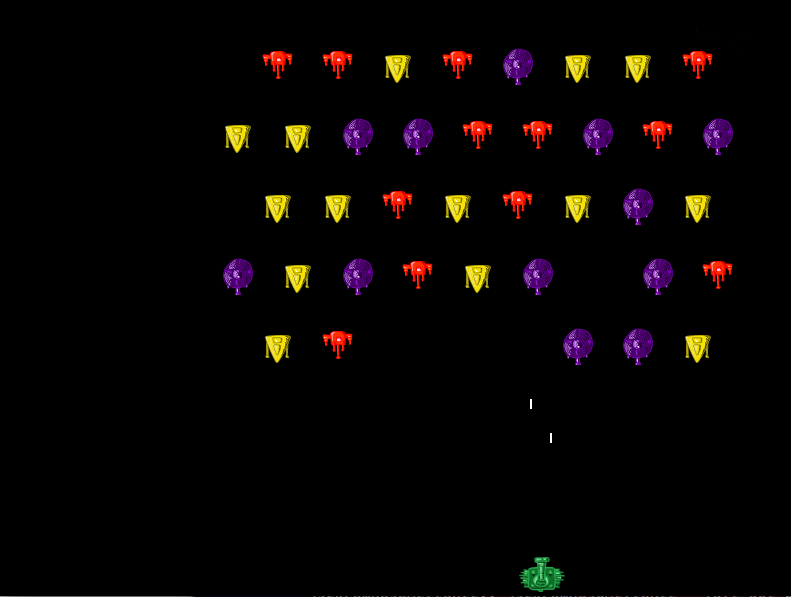
If you run the game several times, you can see that the random combination of enemies is the same every time. To avoid this, you must define math.randomseed before starting the game. It’s good to do this by passing os.time as an argument. Add this to main.lua
function love.load()
    ...
    math.randomseed( os.time() )
    ...
end
Now we have an almost full game, version 0.75 . Dismantled everything that was planned.
I will be glad to reviews, comments, tips!