How to use the HTTP API to send emails
Communication technology has reached a point where it has become insufficient to use one or two channels. Each channel has its advantages and disadvantages, and this is an indisputable fact. You can use push notifications to target and reach users in a specific region. SMSs are usually always read. Viber provides interactive communication and entertaining content. Emails do not bother customers.
In any case, today's customer-oriented ecosystem requires you to adapt communication strategies to the needs of the client. Many already have a platform on which to base their choices. They already use Gmail, Facebook Messenger or Viber and Outlook, as well as a number of other applications. The key factor is that they use each of these channels for specific purposes.
For example, some use Messenger to conduct real-time conversations. At the same time, they prefer to receive newsletters from brands through Gmail. Some want to be contacted via SMS, as it is still the most reliable communication channel. There are clients who prefer to receive voice calls in case of important notifications. Undoubtedly, your customer base requires the use of various methods to fully cover it.

Due to its unique structure, email remains an essential part of multi-channel communications. This is one of the most economical and unobtrusive channels, which makes it one of the preferred ways to communicate with the brand. We are talking about newsletters, but there are a number of other cases in which email works best. From account verification to password reset and account recovery.
That's why billions of messages are emailed daily. According to Ericsson , by 2020, 70% of the world's population will use smartphones, and 90% will enter the coverage area of the global mobile network. It is also important to note that more than 50% of emailsread from mobile devices, not from the desktop, and this number continues to grow. Which means that users will be able to access their accounts at any time.
Our HTTP API offers sending simple and multifunctional emails; You can send HTML emails with attachments and view logs and delivery reports. However, before you start sending out emails, you need to create a valid Infobip account .
If you use our other services through the API, you already have a valid Infobip account, and you can use it to send emails.
Consider in advance all issues that are related to the domain, since the reputation of the sender of the email is closely related to the domain name and IP address. Reputation problems arise when you turn into a "bad" sender, and this can greatly affect the state of the domain. A "bad" sender will spend enormous resources on regaining confidence in himself. So remember that separating domains by message type is a good idea.
If you have not thought out your plan for the domain - do not worry. You can use our test domain to familiarize yourself with the service, and later start using your own domain. After choosing the preferred domain, you will need to contact the account manager, and then we can integrate the domain into our platform. After receiving additional instructions on configuring the DNS and establishing the desired communication channel between your domain and platform, you can proceed to the next step and begin successful mailing of emails.
Feel free to ask any questions you may have and write to us at: [email protected].
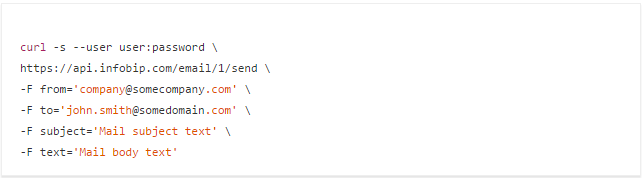
After creating an account, you can send emails. You can send a simple letter or a letter with rich content. If you decide to start sending simple letters, this will mean that you send a single email message to only one address through a request:
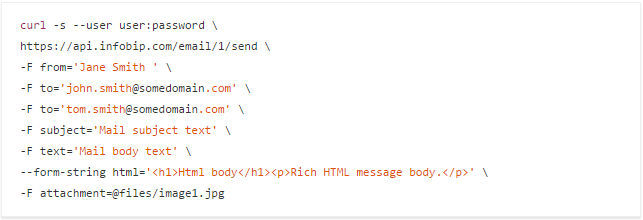
On the other hand, you can send multifunctional electronic messages , which are messages with an attachment (s) sent to one or many addresses:
With the answer (the picture is clickable): This is an example of an email with one attachment, which is sent to two addresses. If you want to send an email with multiple attachments, enter the parameters for multiple attachments in the request.
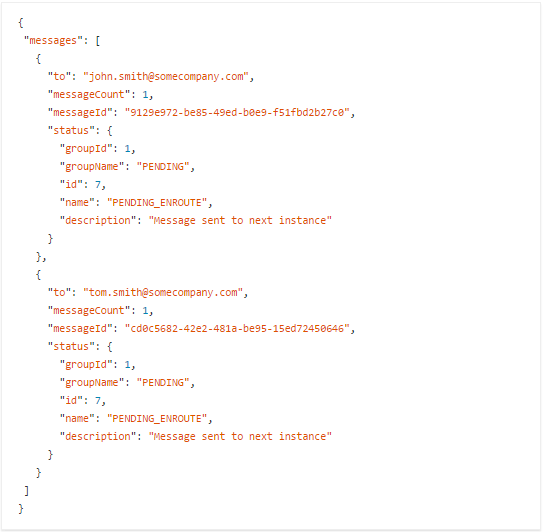
If sent successfully, the header of the HTTP status code response will look like 200 OK, and if you try to send a message without authorization, you will receive an 401 Unauthorized error code .
After sending the email you will receive a one-time delivery report . Delivery reports confirm that the email you sent was successfully delivered. Reports can be received only once, and after receiving the report, you will not be able to request it again.
You can enter parameters for receiving delivery reports, and you can also make requests without any parameters:

Result (the picture is clickable): A delivery report without any parameters will provide you with detailed information about sent emails, including letter status, ID messages, time and date of sending / receiving letters, information about errors, etc. You can also receive a delivery report using messageId:


Another possibility is two initial delivery reports:

Both requests show the details of the message as a request with no parameters, but the difference is that the messageID request retrieves information about a specific message, and the two delivery reports provide information about the two initial messages.
Like delivery reports, send logs provide additional information about sent messages. The key difference is that the logs are available within the last 48 hours, they can be requested any number of times, and you will see the result of the messages regardless of their current status:
Result (the picture is clickable): The response will contain information about all emails, sent via the Infobip platform in the last 48 hours. None of the queries is required for this type, but if you need to find a specific message, you can use the filtering options . For example, logs can be received through one or, in our case, through several message IDs:


Also, a combination of parameters will help you to filter messages more accurately:

This request has two filters (parameters) - sentSince and generalStatus , which will be identified as a single parameter, and the response will contain a message log with all sent and delivered emails from the date of the request.
The status code will be the same as for sent messages; The response header of the HTTP status code will look like 200 OK when sent successfully, and message logs and delivery reports will also be returned, but if you try to send a message without authorization, you will receive a response with the HTTP status code 401 Unauthorized .
This article should help you with the HTTP API integration process.
In any case, today's customer-oriented ecosystem requires you to adapt communication strategies to the needs of the client. Many already have a platform on which to base their choices. They already use Gmail, Facebook Messenger or Viber and Outlook, as well as a number of other applications. The key factor is that they use each of these channels for specific purposes.
For example, some use Messenger to conduct real-time conversations. At the same time, they prefer to receive newsletters from brands through Gmail. Some want to be contacted via SMS, as it is still the most reliable communication channel. There are clients who prefer to receive voice calls in case of important notifications. Undoubtedly, your customer base requires the use of various methods to fully cover it.
Why email?
Due to its unique structure, email remains an essential part of multi-channel communications. This is one of the most economical and unobtrusive channels, which makes it one of the preferred ways to communicate with the brand. We are talking about newsletters, but there are a number of other cases in which email works best. From account verification to password reset and account recovery.
That's why billions of messages are emailed daily. According to Ericsson , by 2020, 70% of the world's population will use smartphones, and 90% will enter the coverage area of the global mobile network. It is also important to note that more than 50% of emailsread from mobile devices, not from the desktop, and this number continues to grow. Which means that users will be able to access their accounts at any time.
Our HTTP API offers sending simple and multifunctional emails; You can send HTML emails with attachments and view logs and delivery reports. However, before you start sending out emails, you need to create a valid Infobip account .
How to create an account
If you use our other services through the API, you already have a valid Infobip account, and you can use it to send emails.
Consider in advance all issues that are related to the domain, since the reputation of the sender of the email is closely related to the domain name and IP address. Reputation problems arise when you turn into a "bad" sender, and this can greatly affect the state of the domain. A "bad" sender will spend enormous resources on regaining confidence in himself. So remember that separating domains by message type is a good idea.
If you have not thought out your plan for the domain - do not worry. You can use our test domain to familiarize yourself with the service, and later start using your own domain. After choosing the preferred domain, you will need to contact the account manager, and then we can integrate the domain into our platform. After receiving additional instructions on configuring the DNS and establishing the desired communication channel between your domain and platform, you can proceed to the next step and begin successful mailing of emails.
Feel free to ask any questions you may have and write to us at: [email protected].
Let's send Email
After creating an account, you can send emails. You can send a simple letter or a letter with rich content. If you decide to start sending simple letters, this will mean that you send a single email message to only one address through a request:
On the other hand, you can send multifunctional electronic messages , which are messages with an attachment (s) sent to one or many addresses:
With the answer (the picture is clickable): This is an example of an email with one attachment, which is sent to two addresses. If you want to send an email with multiple attachments, enter the parameters for multiple attachments in the request.
If sent successfully, the header of the HTTP status code response will look like 200 OK, and if you try to send a message without authorization, you will receive an 401 Unauthorized error code .
Email Delivery Reports and Sending Logs
Email Delivery Reports
After sending the email you will receive a one-time delivery report . Delivery reports confirm that the email you sent was successfully delivered. Reports can be received only once, and after receiving the report, you will not be able to request it again.
You can enter parameters for receiving delivery reports, and you can also make requests without any parameters:
Result (the picture is clickable): A delivery report without any parameters will provide you with detailed information about sent emails, including letter status, ID messages, time and date of sending / receiving letters, information about errors, etc. You can also receive a delivery report using messageId:
Another possibility is two initial delivery reports:
Both requests show the details of the message as a request with no parameters, but the difference is that the messageID request retrieves information about a specific message, and the two delivery reports provide information about the two initial messages.
Email Logs
Like delivery reports, send logs provide additional information about sent messages. The key difference is that the logs are available within the last 48 hours, they can be requested any number of times, and you will see the result of the messages regardless of their current status:
Result (the picture is clickable): The response will contain information about all emails, sent via the Infobip platform in the last 48 hours. None of the queries is required for this type, but if you need to find a specific message, you can use the filtering options . For example, logs can be received through one or, in our case, through several message IDs:
Also, a combination of parameters will help you to filter messages more accurately:
This request has two filters (parameters) - sentSince and generalStatus , which will be identified as a single parameter, and the response will contain a message log with all sent and delivered emails from the date of the request.
The status code will be the same as for sent messages; The response header of the HTTP status code will look like 200 OK when sent successfully, and message logs and delivery reports will also be returned, but if you try to send a message without authorization, you will receive a response with the HTTP status code 401 Unauthorized .
This article should help you with the HTTP API integration process.