 January 25, 2017 at 22:25
Arduino in a car wash
Probably many have already seen self-service car washes. Is it possible to create such a device on Arduino?
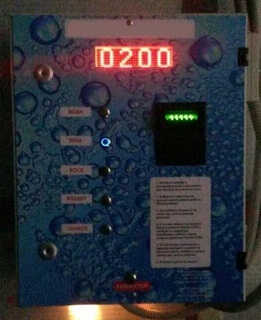
At the same time, the network capabilities of the device allow:
All purchased on Aliexpress (except bill acceptor and shield).
The network shield is simply stuck on top. Further, everything is collected through it.
The buttons are assembled according to the voltage divider circuit and connected to the A5. I have resistors from 200Ω to 3.2KΩ.
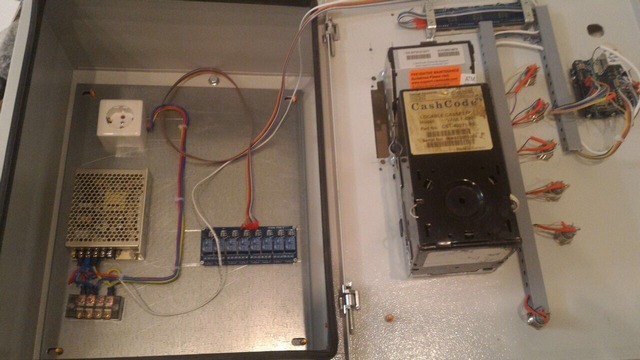
Initialization of a board and relay:
Display of the number on the board (the current value in case of power failure is stored in cells EEPROM 10 and 11):
Reading the button (keydown tracks the return of the buttons to the original to eliminate relay bounce, numbers in the conditions are selected empirically):
Relay operation (service prices per minute of use are stored in cells EEPROM 1-9):
Money counter (when the relay is on and when the counter of milliseconds of the set value is exceeded, subtract 1):
Network client and server are taken from standard Arduino libraries. Bill acceptor works under the CCNET protocol.
UPD:
Part 2 describes the operation of the network and bill acceptor.
The next-generation device on a single-board Orange Pi with a 7 "screen and a touchscreen .
... the next wave of economic disasters ... will be the result of the rapid steps in automation that abolishes many good jobs in the middle class ( B. Obama )
How it works
- Customer arrives at the sink
- It makes money through a bill acceptor (the amount is displayed on the board)
- Presses the button of the necessary equipment
- The client independently washes the car
- If desired, press stop, or select other equipment
- The scoreboard calculates the amount for services (depending on the equipment included)
- When zeroing, the equipment turns off
- If necessary, repeat from step 2
At the same time, the network capabilities of the device allow:
- See all payments made
- Change service pricing settings
- Turn on / off equipment
- Log operations and errors on the server
Part of the equipment
- Arduino Uno R3
- 4-digit matrix module type MAX7219
- Ethernet shield W5100
- 8 relay module
- Buttons
- Resistors
- Wires
- Bill acceptor Cashcode SM
- Electric shield (degree of protection, the greater the better)
All purchased on Aliexpress (except bill acceptor and shield).
Assembly diagram
The network shield is simply stuck on top. Further, everything is collected through it.
Arduino - Cashcode
A0 - 11 (TxD TTL)
A1 - 16 (RxD TTL)
GND - 4 (GND)
Arduino - MAX7219
A4 - CLK
A3 - CS
A2 - DIN
GND - GND
+ 5V - VCC
Arduino - Relays
2-7 - in1-in6
GND - GND
+ 5V - VCC
The buttons are assembled according to the voltage divider circuit and connected to the A5. I have resistors from 200Ω to 3.2KΩ.
Programming
Initialization of a board and relay:
#define DIN 16
#define CS  17
#define CLK 18
#define max7219_reg_decodeMode  0x09
#define max7219_reg_intensity   0x0a
#define max7219_reg_scanLimit   0x0b
#define max7219_reg_shutdown    0x0c
#define max7219_reg_displayTest 0x0f
const unsigned char alf[] = {0,
  28, 34, 34, 34, 34, 34, 34, 28,
  8, 24, 8, 8, 8, 8, 8, 28,
  28, 34, 2, 4, 8, 16, 32, 62,
  28, 34, 2, 4, 2, 2, 34, 28,
  34, 34, 34, 34, 62, 2, 2, 2,
  62, 32, 32, 60, 2, 2, 2, 60,
  28, 32, 32, 60, 34, 34, 34, 28,
  62, 2, 2, 4, 8, 16, 32, 32,
  28, 34, 34, 28, 34, 34, 34, 28,
  28, 34, 34, 30, 2, 2, 2, 28
};
void setup()
{
  pinMode(DIN,OUTPUT);  pinMode(CS,OUTPUT);  pinMode(CLK,OUTPUT);  digitalWrite(CS, HIGH);
  initLed();
  pinMode(2,  OUTPUT);  pinMode(3,  OUTPUT);  pinMode(4,  OUTPUT);  pinMode(5,  OUTPUT);  pinMode(6,  OUTPUT);  pinMode(7,  OUTPUT);
  pinMode (A5, INPUT);
}
void setCommand(byte command, byte value)
{
  digitalWrite(CS, LOW);
  for (int i=0; i<4; i++)   {    shiftOut(DIN,CLK, MSBFIRST, command);    shiftOut(DIN,CLK, MSBFIRST, value);  }
  digitalWrite(CS, HIGH);
}
void initLed()
{
  setCommand(max7219_reg_scanLimit, 0x07);
  setCommand(max7219_reg_decodeMode, 0x00);
  setCommand(max7219_reg_shutdown, 0x01);
  setCommand(max7219_reg_displayTest, 0x00);
  setCommand(max7219_reg_intensity, 1);
}
Display of the number on the board (the current value in case of power failure is stored in cells EEPROM 10 and 11):
int printNumber(int add)
{
  int n=EEPROM.read(10)+EEPROM.read(11)*256;
  if(add!=0) { n+=add; EEPROM.write(10, n%256); EEPROM.write(11, n>>8);   }
  int k;
  for (char i=1; i<=8; i++)
  {
   digitalWrite(CS, LOW);
   for (char j=3; j>=0; j--) { k=n/pow(10,j);  shiftOut(DIN,CLK, MSBFIRST,i);   shiftOut(DIN,CLK, MSBFIRST,alf[i+(k%10)*8]); }
   digitalWrite(CS, HIGH);
  }
  return n;
}
Reading the button (keydown tracks the return of the buttons to the original to eliminate relay bounce, numbers in the conditions are selected empirically):
int key = analogRead (5);
  if(keydown && key<100) keydown=0;
  if((EEPROM.read(10)>0 || EEPROM.read(11)>0) && !keydown)
  {
    if(key>910 && key<980) setRele(1);
    if(key>810 && key<880) setRele(2);
    if(key>710 && key<760) setRele(3);
    if(key>550 && key<690) setRele(4);
    if(key>400 && key<500) setRele(5);
    if(key>330 && key<400) setRele(0);
  }
Relay operation (service prices per minute of use are stored in cells EEPROM 1-9):
void setRele(char r)
{
  rele=r;
  keydown=1;
  for(char i=1;i<6;i++) digitalWrite(i+1, HIGH);
  if(rele)
 {
  digitalWrite(rele+1, LOW);
  timeRele=millis();
  timeAllRele=60000/EEPROM.read(rele);
 }
}
Money counter (when the relay is on and when the counter of milliseconds of the set value is exceeded, subtract 1):
 if(rele>0 && rele<=5 && (millis()-timeRele)>timeAllRele)
{
 if(printNumber(-1)==0) setRele(0);
 timeRele+=timeAllRele;
}
Network client and server are taken from standard Arduino libraries. Bill acceptor works under the CCNET protocol.
UPD:
Part 2 describes the operation of the network and bill acceptor.
The next-generation device on a single-board Orange Pi with a 7 "screen and a touchscreen .









