 July 30, 2016 at 23:34
UEFI / BIOS update on Linux
- Tutorial
It's no secret that manufacturers of motherboards and laptops do not always allow Linux users to upgrade UEFI/BIOSfirmware as unobtrusively as Windows users do. However, for the HP EliteBook 840G1 that I use, it’s a little harder to do.
The following artifacts will be needed for this case:
- FAT32 EFI System Partition (ESP)
- WINE
- Alternating electric current
FAT32 ESP
HP EliteBook Notebook PCs come with 3 boot modes. You can find out which mode is selected in the settings UEFI/BIOS→ System Configuration→ Boot Mode. This section should be read if only the last, uncompromising mode has been selected UEFI, in other cases you can slip through.
- Legacy
- UEFI Hybrid with compatibility support module (CSM)
- UEFI Native without CSM
If you carefully read the topic about Linux kernel EFI Boot Stub , then you probably know what and how to do in order to create a disk partition. You can use gdisk, partedor KDE Disk Partitionto create an ESP partition. This is what a ready-made section looks like.
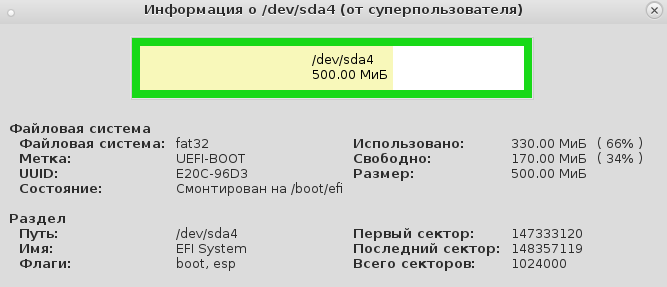
It is recommended that the ESP partition be mounted in /boot/efi, and not just in /boot, in order to be able to store Linux kernel images and OS bootloader files on regular Linux FS, instead of keeping everything in the FAT32 EFI System Partition.
(4:549)$ grep efi /etc/fstab
/dev/sda4               /boot/efi   vfat            rw,users,noauto 0 2
We already know what it UEFI/BIOSwill look for \EFI\BOOT\bootx64.efi, why there should be an absolute path to the file /boot/efi/EFI/Boot/Bootx64.efi, otherwise everything is gone and UEFI/BIOSthe OS loader will not find it! This does not hurt updating the system firmware, but why then do you need firmware if you cannot load the operating system? It is very important that, by default, GRUB-2 does not copy the necessary file and therefore bootx64.efimust be copied manually .
(4:569) sudo cp /boot/grub/x86_64-efi/core.efi /boot/efi/EFI/Boot/Bootx64.efiTraining
We take the latest firmware from the HP website , select Linux in the drop-down list of OS, then BIOS, download ... and find the executable file for Windows - sp64081.exe. No, our eyes didn’t let us down.
(4:520)$ file sp64081.exe
sp64081.exe: PE32 executable (GUI) Intel 80386, for MS Windows
Experienced users are ready for such surprises, for which they hold a Windows VM or use a non-emulator WINE, or both together, since there are different cases. To unzip the file, WINE capabilities are enough. We launch:
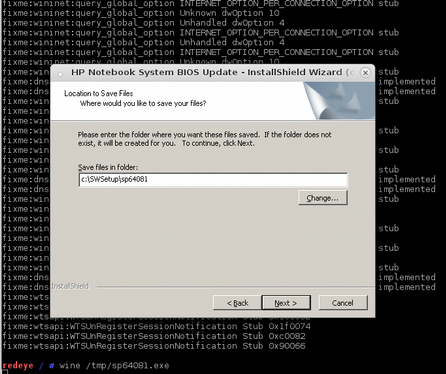
The program terminates with a tactless error, reminding once again that they slipped us not what we expected.
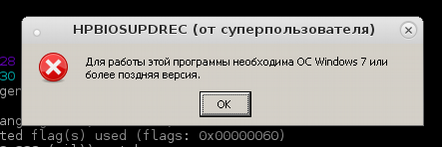
However, this should not worry anyone, since the files were unpacked correctly and nothing was needed beyond that.
(4:529)$ ls -Rl sp64081/
sp64081/:
итого 18188
drwxr-xr-x 1 root root     356 июл 30 10:52 BIOSUpdate
-rw-r--r-- 1 root root 2950466 мар  4  2013 BIOSUpdateEFI.7z
-rwxr-xr-x 1 root root 4838072 авг  7  2013 HPBIOSUPDREC.exe
-rw-r--r-- 1 root root     883 июл 30 10:52 HPBIOSUPDREC.log
-rwxr-xr-x 1 root root 2353368 сен 18  2013 HpqPswd.exe
-rwxr-xr-x 1 root root   77824 фев 22  2012 Installer.exe
-rw-r--r-- 1 root root 8388608 окт  9  2013 L71_0104.bin
-rw-r--r-- 1 root root    1543 окт 24  2013 WSSP64081.rtf
sp64081/BIOSUpdate:
итого 2368
-rw-r--r-- 1 root root 259072 ноя  5  2012 CryptRSA32.efi
-rw-r--r-- 1 root root 443904 ноя  5  2012 CryptRSA.efi
-rw-r--r-- 1 root root 820784 июл  8  2013 HpBiosUpdate32.efi
-rw-r--r-- 1 root root    256 июл  8  2013 HpBiosUpdate32.s09
-rw-r--r-- 1 root root    256 июл  8  2013 HpBiosUpdate32.s12
-rw-r--r-- 1 root root    256 июл  8  2013 HpBiosUpdate32.sig
-rw-r--r-- 1 root root  16384 июл  9  2013 HpBiosUpdate.dll
-rw-r--r-- 1 root root 850512 июл  8  2013 HpBiosUpdate.efi
-rw-r--r-- 1 root root    256 июл  8  2013 HpBiosUpdate.s09
-rw-r--r-- 1 root root    256 июл  8  2013 HpBiosUpdate.s12
-rw-r--r-- 1 root root    256 июл  8  2013 HpBiosUpdate.sig
From this list, we need only 3 file: L71_0137.bin, HpBiosUpdate.efiand HpBiosUpdate.s12now attention: copy the files you need exactly the specified location.
(4:534)$ ls -lR /boot/efi/EFI/HP/
/boot/efi/EFI/HP/:
итого 8
drwxr-xr-x 3 root root 4096 сен 22  2015 BIOS
drwxr-xr-x 2 root root 4096 июл 21 22:23 BIOSUpdate
/boot/efi/EFI/HP/BIOS:
итого 4
drwxr-xr-x 2 root root 4096 июл 21 22:05 New
/boot/efi/EFI/HP/BIOS/New:
итого 8192
-rwxr-xr-x 1 root root 8388608 май 23 13:57 L71_0137.bin
/boot/efi/EFI/HP/BIOSUpdate:
итого 840
-rwxr-xr-x 1 root root 850512 июл  8  2013 HpBiosUpdate.efi
-rwxr-xr-x 1 root root   3916 июл 21 22:23 HpBiosUpdate.log
-rwxr-xr-x 1 root root    256 июл  8  2013 HpBiosUpdate.s12
1291/7720MB
To get to the setup menu, UEFI/BIOSafter switching on, press the key Escor F10and then File→ Update System BIOS.
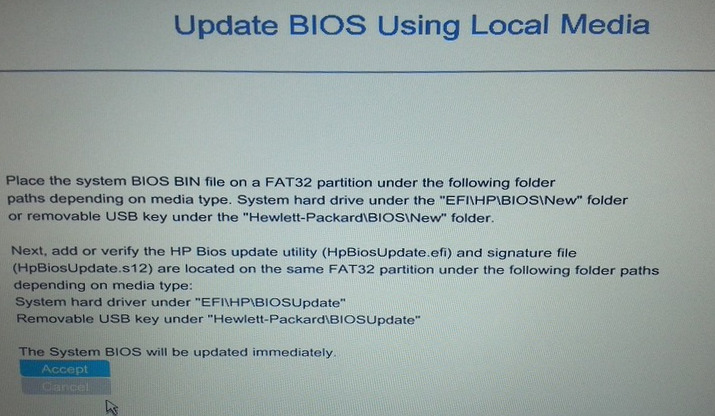
After selection Accept, the update process starts without other curtsies. Apparently knowing the price of their batteries, manufacturers update the firmware only when the computer is powered on. 2-3 minutes, and the process is successfully completed.
UPDATE : Following some common ideas, some additions are needed in the comments.
- You can copy the same 3 files to a USB flash drive, in the prescribed paths and using it to update the firmware. Partitioning the file system must be FAT32 ESP.
- You can upgrade from
File→Update System BIOSdirectly via the Internet if a network cable is connected. The update will not work via WiFi connection. - Instead of WINE, it is enough to use to unpack the archive
7z e sp64081.exe.









