 July 6, 2016 at 09:15
How to create Telegram bot using WCF service
Hello, Habr. Somehow it became necessary to make a bot helper, but with two conditions - to use the WCF service and Telegram. Since I had to spend a sufficient amount of time on implementation, I decided to write an article, maybe someone will be useful.
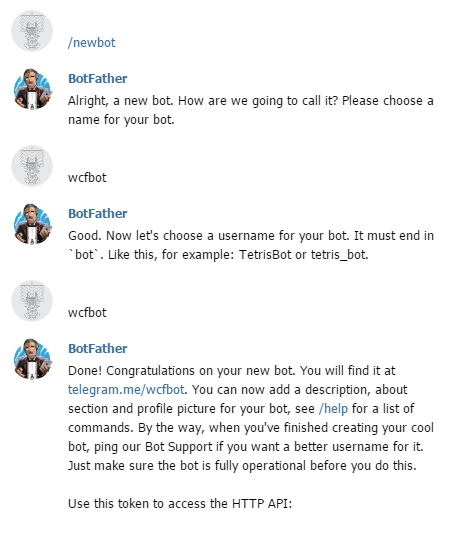
Creating your own bot is very simple - go to the telegram, find the special bot @BotFather , write the / newbot command to it and follow its instructions, as a result we get the token of our bot.
Now we need to decide how we will receive updates from the bot. Telegram provides two ways - pull yourself using the getUpdates method , or use Webhook. With the first method, everything is clear, we are more interested in the second option. Using the setWebhook MethodYou can set the URL of the webhook, thereby you kind of tell the Telegram servers where they should send all updates. Our WCF service will act as the webhook.
Let's create a new project “WCF service application” and call it “WcfBot”. The Telegram documentation says that in the updates we get the Update object serialized in JSON, so we will create a class for this object in a new file. Json2charp helped us with this .
Now open the IService1.cs file, which contains the IService1 interface with the ServiceContract attribute - this is the service contract. Add a service operation to it and add the WebInvoke attribute to this operation, which determines which HTTP method the service operation responds to, what format the data receives and at what URL to access it.
IService1.cs
Next, open the file Service1.svc.cs and add the implementation of our operation in the class Service1.
Service1.svc.cs
Now we need to send a response to the message on behalf of the bot. The Telegram.Bot library will help us with this . To install it, go to the package manager console (Tools -> NuGet Package Manager -> Package Manager Console) and write: Now in the method we initialize the Telegram.Bot.Api object using our token, which we were given when creating the bot in a telegram, and we implement the response to the message “Hello”. Service1.svc.cs
It remains to edit the Web.config configuration file by adding to the behaviors:
and in system.serviceModel:
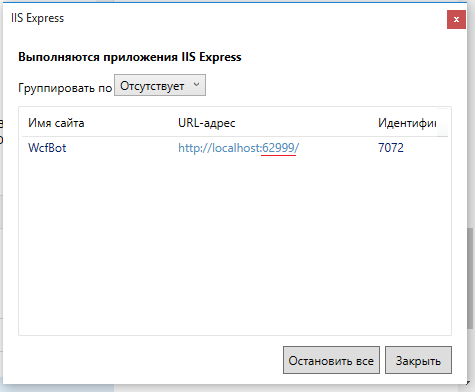
Now you can test. We start the service, go to the tray, find IIS Express, right-click, click "Show all applications", find our service, look at which port it turned on.
In order for the telegram servers to access your service, you need to share localhost. For these purposes ngrok is suitable .
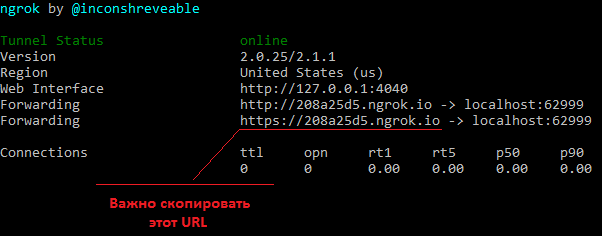
Download ngrok, unpack it, run ngrok.exe and enter the command: Instead of 1234 - the port of our service. As a result, ngrok will give us the URL to our service. It is important to copy the https version of the link, since Telegram only supports the secure HTTPS protocol. Now it remains only to tell our bot the address where to send messages. To do this, simply drive the link into the address bar of the browser:
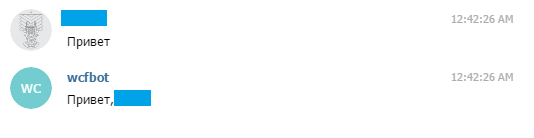
That's all, now you can write to the bot and make sure that it really answers.
[ Sources ]
Creating your own bot is very simple - go to the telegram, find the special bot @BotFather , write the / newbot command to it and follow its instructions, as a result we get the token of our bot.
Now we need to decide how we will receive updates from the bot. Telegram provides two ways - pull yourself using the getUpdates method , or use Webhook. With the first method, everything is clear, we are more interested in the second option. Using the setWebhook MethodYou can set the URL of the webhook, thereby you kind of tell the Telegram servers where they should send all updates. Our WCF service will act as the webhook.
Let's create a new project “WCF service application” and call it “WcfBot”. The Telegram documentation says that in the updates we get the Update object serialized in JSON, so we will create a class for this object in a new file. Json2charp helped us with this .
Update.cs
namespace WcfBot
{
    public class From
    {
        public long id { get; set; }
        public string first_name { get; set; }
        public string last_name { get; set; }
        public string username { get; set; }
    }
    public class Chat
    {
        public long id { get; set; }
        public string first_name { get; set; }
        public string last_name { get; set; }
        public string username { get; set; }
    }
    public class ForwardFrom
    {
        public long id { get; set; }
        public string first_name { get; set; }
        public string last_name { get; set; }
        public string username { get; set; }
    }
    public class Audio
    {
        public string file_id { get; set; }
        public long duration { get; set; }
        public string performer { get; set; }
        public string title { get; set; }
        public string mime_type { get; set; }
        public long file_size { get; set; }
    }
    public class Thumb
    {
        public string file_id { get; set; }
        public long width { get; set; }
        public long height { get; set; }
        public long file_size { get; set; }
    }
    public class Document
    {
        public string file_id { get; set; }
        public Thumb thumb { get; set; }
        public string file_name { get; set; }
        public string mime_type { get; set; }
        public long file_size { get; set; }
    }
    public class Photo
    {
        public string file_id { get; set; }
        public long width { get; set; }
        public long height { get; set; }
        public long file_size { get; set; }
    }
    public class Sticker
    {
        public string file_id { get; set; }
        public string width { get; set; }
        public string height { get; set; }
        public Thumb thumb { get; set; }
        public long file_size { get; set; }
    }
    public class Video
    {
        public string file_id { get; set; }
        public long width { get; set; }
        public long height { get; set; }
        public long duration { get; set; }
        public Thumb thumb { get; set; }
        public string mime_type { get; set; }
        public long file_size { get; set; }
    }
    public class Voice
    {
        public string file_id { get; set; }
        public long duration { get; set; }
        public string mime_type { get; set; }
        public long file_size { get; set; }
    }
    public class Contact
    {
        public string phone_number { get; set; }
        public string first_name { get; set; }
        public string last_name { get; set; }
        public long user_id { get; set; }
    }
    public class Location
    {
        public double longitude { get; set; }
        public double latitude { get; set; }
    }
    public class NewChatParticipant
    {
        public long id { get; set; }
        public string first_name { get; set; }
        public string last_name { get; set; }
        public string username { get; set; }
    }
    public class LeftChatParticipant
    {
        public long id { get; set; }
        public string first_name { get; set; }
        public string last_name { get; set; }
        public string username { get; set; }
    }
    public class NewChatPhoto
    {
        public string file_id { get; set; }
        public long width { get; set; }
        public long height { get; set; }
        public long file_size { get; set; }
    }
    public class ReplyToMessage
    {
        public long message_id { get; set; }
        public From from { get; set; }
        public long date { get; set; }
        public Chat chat { get; set; }
        public ForwardFrom forward_from { get; set; }
        public long forward_date { get; set; }
        public object reply_to_message { get; set; }
        public string text { get; set; }
        public Audio audio { get; set; }
        public Document document { get; set; }
        public IList photo { get; set; }
        public Sticker sticker { get; set; }
        public Video video { get; set; }
        public Voice voice { get; set; }
        public string caption { get; set; }
        public Contact contact { get; set; }
        public Location location { get; set; }
        public NewChatParticipant new_chat_participant { get; set; }
        public LeftChatParticipant left_chat_participant { get; set; }
        public string new_chat_title { get; set; }
        public IList new_chat_photo { get; set; }
        public bool delete_chat_photo { get; set; }
        public bool group_chat_created { get; set; }
    }
    public class Message
    {
        public long message_id { get; set; }
        public From from { get; set; }
        public long date { get; set; }
        public Chat chat { get; set; }
        public ForwardFrom forward_from { get; set; }
        public long forward_date { get; set; }
        public ReplyToMessage reply_to_message { get; set; }
        public string text { get; set; }
        public Audio audio { get; set; }
        public Document document { get; set; }
        public IList photo { get; set; }
        public Sticker sticker { get; set; }
        public Video video { get; set; }
        public Voice voice { get; set; }
        public string caption { get; set; }
        public Contact contact { get; set; }
        public Location location { get; set; }
        public NewChatParticipant new_chat_participant { get; set; }
        public LeftChatParticipant left_chat_participant { get; set; }
        public string new_chat_title { get; set; }
        public IList new_chat_photo { get; set; }
        public bool delete_chat_photo { get; set; }
        public bool group_chat_created { get; set; }
    }
    public class Update
    {
        public long update_id { get; set; }
        public Message message { get; set; }
    }
}
Now open the IService1.cs file, which contains the IService1 interface with the ServiceContract attribute - this is the service contract. Add a service operation to it and add the WebInvoke attribute to this operation, which determines which HTTP method the service operation responds to, what format the data receives and at what URL to access it.
IService1.cs
namespace WcfBot
{
    [ServiceContract]
    public interface IService1
    {
        [OperationContract]
        [WebInvoke(Method = "POST", RequestFormat = WebMessageFormat.Json, ResponseFormat = WebMessageFormat.Json, UriTemplate = @"/Update")]
        void GetUpdate(Update update);
    }
}
Next, open the file Service1.svc.cs and add the implementation of our operation in the class Service1.
Service1.svc.cs
namespace WcfBot
{
    public class Service1 : IService1
    {
        public void GetUpdate(Update update)
        {
        }
    }
}
Now we need to send a response to the message on behalf of the bot. The Telegram.Bot library will help us with this . To install it, go to the package manager console (Tools -> NuGet Package Manager -> Package Manager Console) and write: Now in the method we initialize the Telegram.Bot.Api object using our token, which we were given when creating the bot in a telegram, and we implement the response to the message “Hello”. Service1.svc.cs
Install-Package Telegram.Bot
namespace WcfBot
{
    public class Service1 : IService1
    {
        public void GetUpdate(Update update)
        {
            var Bot = new Telegram.Bot.Api("");
            if(update.message.text == "Привет")
            {
                Bot.SendTextMessage(update.message.chat.id, "Привет," + update.message.from.first_name);
            }
        }
    }
}
It remains to edit the Web.config configuration file by adding to the behaviors:
and in system.serviceModel:
Now you can test. We start the service, go to the tray, find IIS Express, right-click, click "Show all applications", find our service, look at which port it turned on.
In order for the telegram servers to access your service, you need to share localhost. For these purposes ngrok is suitable .
Download ngrok, unpack it, run ngrok.exe and enter the command: Instead of 1234 - the port of our service. As a result, ngrok will give us the URL to our service. It is important to copy the https version of the link, since Telegram only supports the secure HTTPS protocol. Now it remains only to tell our bot the address where to send messages. To do this, simply drive the link into the address bar of the browser:
ngrok http 1234 -host-header=”localhost:1234”
https://api.telegram.org/bot
That's all, now you can write to the bot and make sure that it really answers.
[ Sources ]









