September 2, 2015 at 14:24
Small utility for GLPI + FusionInventory bundle
How many copies were broken about this bunch - do not count. The forum of both products is bursting with questions. But here I did not find answers, as well as questions like mine. Well, or at least intelligible answers to them.
I had only two questions:
Naturally, I wanted to solve both issues without getting up from my chair. Although there is not much technology, but territorially it is in several regions, so that you can’t get around everyone.
All further gestures were carried out on the following configuration: KVM virtual machine, 1Gb RAM, 10 GB HDD, Debian 7, GLPI 0.85.4, FusionInventory Plugin 1.2
Everything turned out to be quite simple with the first question. All values are stored in MySQL, so all that was left was to find all the dependencies and check to see if any record inside the GLPI was breaking a direct write to the database.
As a result, we got such a script here (Caution: Bydlokod!):
Two tables are used:
We get the current page counter from the printer via SNMP, compare it with the current one in GLPI, and if it is more, write it to the database and change the date the record was changed.
A week of tests showed that accounting is carried out correctly, nothing breaks and the script was set against a working GLPI. The result is this picture:

It is strange that a high-capacity cartridge printed 100 pages more. And I thought, it only seemed to me that they were changing at approximately the same interval. But these are questions to those who run them.
The second question confused my laziness. Either rebuild the thinstation, which leads to another headache with rdesktop, freerdp, sound and modules, or maximize the perl castration, because the fusioninventory-agent is written entirely on it, and assemble your module.
Actually, the second option won, because I didn’t want to burden the assembly once again, and the inventory was not a daily routine, I launched it once a week and was normal.
For a couple of days of an agent’s leisurely digging, the necessary (well, actually standard) utilities for iron inventory were identified: lspci, lsusb, fdisk, arch, dmidecode, get-edid, ifconfig, parse-edid and others. Here the first pitfall was revealed: lspci, fdisk and many other utilities in Thinstation - these are just aliases to busybox and, of course, do not work with the necessary keys.
The second pitfall was the definition of architecture. For some reason, the agent received the linux-thread-multi value and everything stopped further, since processing of such an architecture is not provided. I had to put a crutch in Agent / Task / Inventory / Linux / i386.pm:
It was:
It became:
The remaining stones were from the series “the necessary utility does not work, does not return values, so we will not inventory”. To fix it, I had to push lspci, lsusb, fdisk, arch, dmidecode, get-edid, parse-edid into the assembly and change the paths to these utilities in the agent scripts. Strange, but almost all the paths were spelled out as absolute. Well, yes, this is a matter of developers.
The executable script that starts the agent turned out like this:
The script is run by the crown, twice a day inventory. The day of inventory is selected independently. I have it every Monday.
The first working assembly of the module was born large in size - 13 mb. But it worked. And worked with a bang.
As a result of “file refinement”, the module size decreased to 5.1 mb. There is simply nothing more to throw out.
Link to the final version of the module
Before using the module, it is necessary to correct the path to your GLPI in it. The file is opened and unpacked as a regular tar.gz archive. Edit ./FusionInventory/etc/agent.cfg file
I know that this is a flaw, but I did not find how to get my parameters from thinstation.conf.network at boot time.
Thanks for attention!
For information on Thinstation, thanks to thinstation.pro , who explained to me how to build custom modules for thin clients.
UPD:
Dealt with the transfer of parameters. Now, to set the address of the inventory server, just add the line in the thinstation.conf.network file
I had only two questions:
- How to force the printed page counter for network printers to change? FusionInventory internally stores the value obtained by SNMP during the inventory, but the main field does not update.
- How to start an inventory on diskless stations running Thinstation? As in any not-too-large company, money for licensing is given by gritting one’s teeth all over the district, and even once every five years. As a result, there is a variegated park of diskless stations assembled from what was at hand.
Naturally, I wanted to solve both issues without getting up from my chair. Although there is not much technology, but territorially it is in several regions, so that you can’t get around everyone.
All further gestures were carried out on the following configuration: KVM virtual machine, 1Gb RAM, 10 GB HDD, Debian 7, GLPI 0.85.4, FusionInventory Plugin 1.2
Everything turned out to be quite simple with the first question. All values are stored in MySQL, so all that was left was to find all the dependencies and check to see if any record inside the GLPI was breaking a direct write to the database.
As a result, we got such a script here (Caution: Bydlokod!):
#!/bin/bash
msql_u='glpi' #Пользователь MySQL
msql_p='glpi' #Пароль MySQL
msql_db='glpi' #БД MySQL
mysql -u $msql_u -p$msql_p -D $msql_db -B -N -s -e 'select id,last_pages_counter from glpi_printers where (have_ethernet = 1);'| while read -r line
do
printer_glpi_counter=$(echo $line | awk '{print $2}')
printer_ip=$(mysql -u $msql_u -p$msql_p -D $msql_db -B -N -s -e "SELECT name FROM glpi_ipaddresses WHERE mainitems_id = $(echo $line | awk '{print $1}') AND mainitemtype = 'Printer';")
printer_cur_counter=$(snmpwalk -Ovq -c public -v 1 $printer_ip 1.3.6.1.2.1.43.10.2.1.4.1.1 2>/dev/null)
if [ $printer_cur_counter -gt $printer_glpi_counter ] ;
  then
    mysql -u $msql_u -p$msql_p -D $msql_db -B -N -s -e "UPDATE glpi_printers SET last_pages_counter=$printer_cur_counter,date_mod=NOW() WHERE id=$(echo $line | awk '{print $1}')"
fi
done
Two tables are used:
- glpi_printers - contains the name of the printer, communications on its board (we select only network - where (have_ethernet = 1)), counters, and a bunch of other information
- glpi_ipaddresses - contains the IP addresses of network devices, their type, and the id of this device
We get the current page counter from the printer via SNMP, compare it with the current one in GLPI, and if it is more, write it to the database and change the date the record was changed.
A week of tests showed that accounting is carried out correctly, nothing breaks and the script was set against a working GLPI. The result is this picture:
It is strange that a high-capacity cartridge printed 100 pages more. And I thought, it only seemed to me that they were changing at approximately the same interval. But these are questions to those who run them.
The second question confused my laziness. Either rebuild the thinstation, which leads to another headache with rdesktop, freerdp, sound and modules, or maximize the perl castration, because the fusioninventory-agent is written entirely on it, and assemble your module.
Actually, the second option won, because I didn’t want to burden the assembly once again, and the inventory was not a daily routine, I launched it once a week and was normal.
For a couple of days of an agent’s leisurely digging, the necessary (well, actually standard) utilities for iron inventory were identified: lspci, lsusb, fdisk, arch, dmidecode, get-edid, ifconfig, parse-edid and others. Here the first pitfall was revealed: lspci, fdisk and many other utilities in Thinstation - these are just aliases to busybox and, of course, do not work with the necessary keys.
The second pitfall was the definition of architecture. For some reason, the agent received the linux-thread-multi value and everything stopped further, since processing of such an architecture is not provided. I had to put a crutch in Agent / Task / Inventory / Linux / i386.pm:
It was:
return $Config{archname} =~ /^(i686|x86_64)/;
It became:
return $Config{archname} =~ /^(i686|x86_64|linux-thread-multi)/;
The remaining stones were from the series “the necessary utility does not work, does not return values, so we will not inventory”. To fix it, I had to push lspci, lsusb, fdisk, arch, dmidecode, get-edid, parse-edid into the assembly and change the paths to these utilities in the agent scripts. Strange, but almost all the paths were spelled out as absolute. Well, yes, this is a matter of developers.
The executable script that starts the agent turned out like this:
#!/bin/sh
export PERL5LIB=/FusionInventory/perl/lib/:/FusionInventory/agent/:/FusionInventory/perl/agent/:/FusionInventory/perl/site/lib:/FusionInventory/perl/vendor/lib/
cd /FusionInventory/perl/bin
./perl fusioninventory-agent -f
The script is run by the crown, twice a day inventory. The day of inventory is selected independently. I have it every Monday.
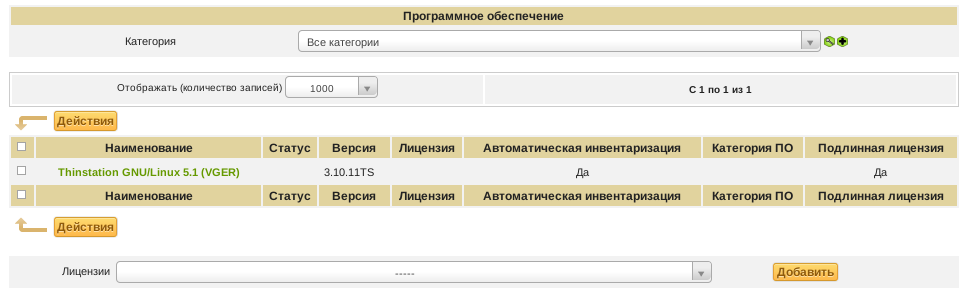
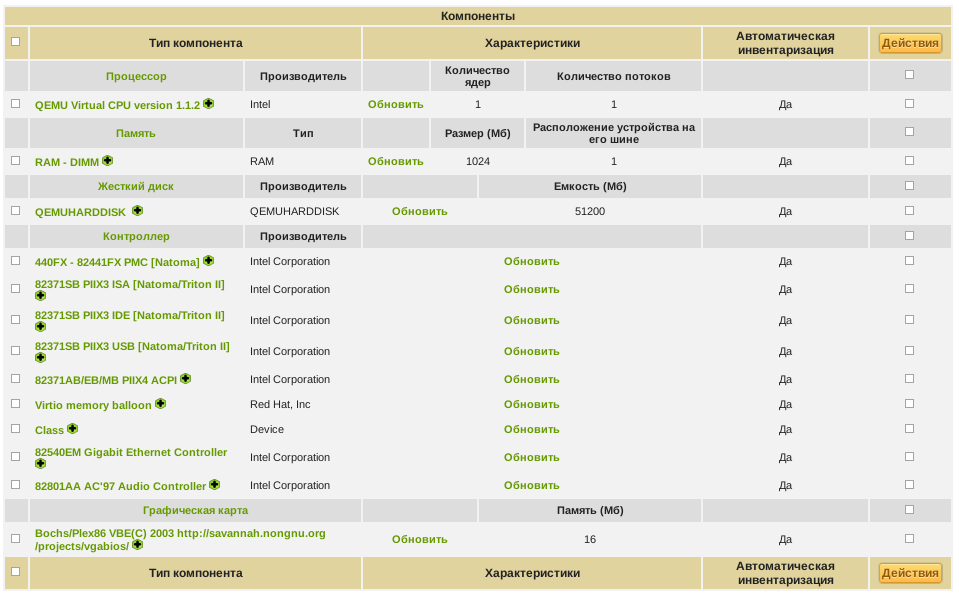
The first working assembly of the module was born large in size - 13 mb. But it worked. And worked with a bang.
Thinstation Inventory Screens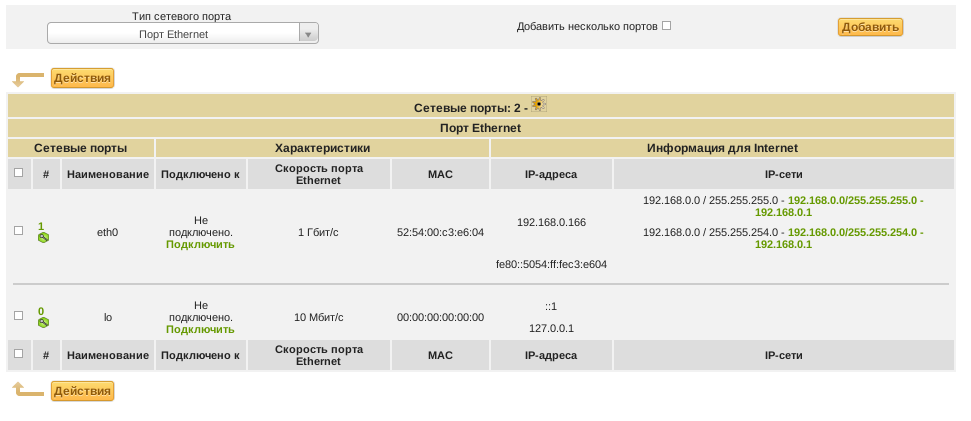

As a result of “file refinement”, the module size decreased to 5.1 mb. There is simply nothing more to throw out.
Link to the final version of the module
Before using the module, it is necessary to correct the path to your GLPI in it. The file is opened and unpacked as a regular tar.gz archive. Edit ./FusionInventory/etc/agent.cfg file
I know that this is a flaw, but I did not find how to get my parameters from thinstation.conf.network at boot time.
Thanks for attention!
For information on Thinstation, thanks to thinstation.pro , who explained to me how to build custom modules for thin clients.
UPD:
Dealt with the transfer of parameters. Now, to set the address of the inventory server, just add the line in the thinstation.conf.network file
FUSION_SERVER="http://адрес_вашего_сервера/plugins/fusioninventory/"