
What actually happens with MAC randomization in iOS 8
Usually, when you roam with a device with WiFi that is not connected to the network, it sends out broadcast requests to try to find known networks. These requests are sent using the MAC address of your phone’s WiFi adapter, which is unique and usually permanent. This means that anyone who monitors these requests, say, in a department store, for example, can constantly monitor you in the store and after several visits. This information is not tied to your personal data, but analytic companies can gather a lot of information about your shopping habits from it, and some users are not happy about it.
How it should work
Starting with iOS 8, Apple devices must randomly change their MAC address by sending out these WiFi requests. The OS is responsible for creating random, locally managed MAC addresses. It is hoped that until you are connected to wireless access points, your device can no longer be used to track you. Since these are WiFi requests, their distance is limited. Those who want to track the presence and movement of your device should be relatively close. One of the places we have seen this is in department stores to monitor customer buying habits. With the new MAC address periodically generated for your device, there will no longer be a permanent token for passive surveillance.
How does it seem to work
Unfortunately, it seems that Apple's changes in the behavior of these queries are not exactly what we hoped for. A couple of weeks ago, a representative of GISi Indoors, a company engaged in indoor navigation and location analytics, contacted us saying that they tested changes in functionality in the beta of iOS 8 and saw how it works. We launched Wireshark to take a look for ourselves.
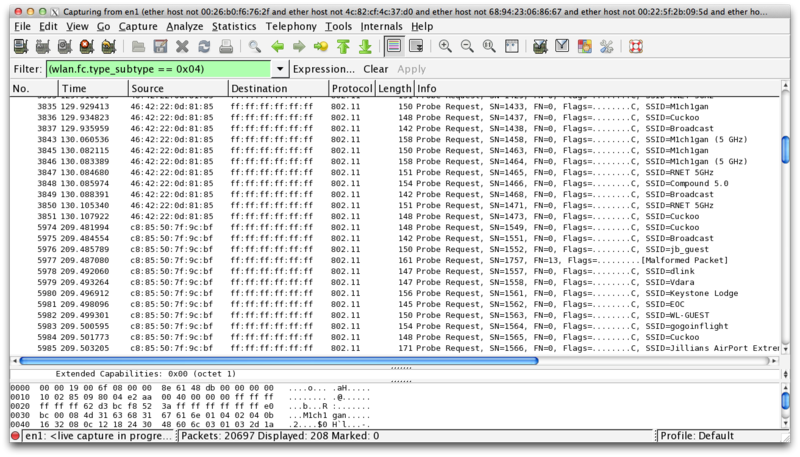
Of course, we saw that our device joyfully sends out WiFi requests using its real MAC address, and we were not alone in this. Security researcher Hubert Seiwert, creator of the iSniff utility, has seen the same behavior. At first, it seemed like MAC randomization didn't work at all, and that was weird as Apple emphasized this feature when publishing.
After long digging and many sleepless nights of monitoring traffic at Wireshark, it became clear that Apple seemed to have made this feature as stated, but not quite as expected. At a WWDC conference in a session on user privacy, the slide said: “The MAC address used for WiFi scanning will not always be a real (universal) address.” They did not say that he would never be a real MAC, only that he could not always be him.
AirTight analyst firm released extremely detailed reports last weekabout testing MAC randomization in iOS 8 and getting similar results. If you have not read them yet, I highly recommend a look. Their testing seems to be very extensive, although their results do not completely coincide with ours.
In our testing, we found that in order for the randomization functionality to work, the devices supported by iOS 8 must meet two criteria. Firstly, the device should not be connected to WiFi, which makes sense. Secondly, the device must be in sleep mode. AirTight concluded that Location Services and the cellular service must also be turned off, but if you look closely, I don’t think so.
On iPhone 6 running iOS 8.0.2, I was able to watch WiFi requests sent with a randomized MAC address with location services and cellular service turned on. The problem is that if you have a cellular connection, your phone usually does not fall asleep for a long time. Even if the screen falls asleep, the phone can remain active, for example, by receiving a new e-mail by push notification. Even if you turn off alerts, the phone wakes up when this message arrives, even though the screen remains off.
Unfortunately, the requirement that the phone be in sleep mode makes this function almost useless, although it matches Apple’s description at WWDC. In order to use random MAC addresses, I had to turn off notifications for several applications, disable push for email and not sleep until night, so that there was a greater chance for the phone to fall asleep without interruption for more than a minute or two. Even under these circumstances, I was able to see only one or two rounds of requests (which seem to be sent every couple of minutes) with random MAC addresses before the phone issued a packet of requests with a real MAC. I think this could be due to some kind of push notification process that woke up the phone. With cellular enabled, I saw only about 50% of requests coming from randomly assigned MAC addresses.
This feature seems even more useless, because although the requests come with a random MAC, they contain 5 SSIDs of the networks to which the phone was previously connected. This means that even when the MAC is random, the broadcast SSIDs can serve as the “fingerprint” of my phone. The MAC address may be random every time, but if every request sends the same set of 5 network names every few minutes, it still remains possible to track my device.
Should we worry?
Ultimately, this feature is not what Apple should have done; this is what they decided to do to help user privacy. Theoretically, it was a great idea, but the execution seems to have nothing really useful. It’s not worse for users than it was in iOS 7, and this information is still not directly tied to a person, but it gives companies (and individuals) the ability to track anonymous individuals without their consent. This is useful primarily for stores, marketers and analytic companies to analyze consumer trends and habits, but ideally this is something that users should have some control over. This data is almost equal to the information about us, and we should have the last word in who can use this data. I hope Apple can make adjustments to the process of randomizing MAC addresses.
translation: www.imore.com/closer-look-ios-8s-mac-randomization
How it should work
Starting with iOS 8, Apple devices must randomly change their MAC address by sending out these WiFi requests. The OS is responsible for creating random, locally managed MAC addresses. It is hoped that until you are connected to wireless access points, your device can no longer be used to track you. Since these are WiFi requests, their distance is limited. Those who want to track the presence and movement of your device should be relatively close. One of the places we have seen this is in department stores to monitor customer buying habits. With the new MAC address periodically generated for your device, there will no longer be a permanent token for passive surveillance.
How does it seem to work
Unfortunately, it seems that Apple's changes in the behavior of these queries are not exactly what we hoped for. A couple of weeks ago, a representative of GISi Indoors, a company engaged in indoor navigation and location analytics, contacted us saying that they tested changes in functionality in the beta of iOS 8 and saw how it works. We launched Wireshark to take a look for ourselves.
Of course, we saw that our device joyfully sends out WiFi requests using its real MAC address, and we were not alone in this. Security researcher Hubert Seiwert, creator of the iSniff utility, has seen the same behavior. At first, it seemed like MAC randomization didn't work at all, and that was weird as Apple emphasized this feature when publishing.
After long digging and many sleepless nights of monitoring traffic at Wireshark, it became clear that Apple seemed to have made this feature as stated, but not quite as expected. At a WWDC conference in a session on user privacy, the slide said: “The MAC address used for WiFi scanning will not always be a real (universal) address.” They did not say that he would never be a real MAC, only that he could not always be him.
AirTight analyst firm released extremely detailed reports last weekabout testing MAC randomization in iOS 8 and getting similar results. If you have not read them yet, I highly recommend a look. Their testing seems to be very extensive, although their results do not completely coincide with ours.
In our testing, we found that in order for the randomization functionality to work, the devices supported by iOS 8 must meet two criteria. Firstly, the device should not be connected to WiFi, which makes sense. Secondly, the device must be in sleep mode. AirTight concluded that Location Services and the cellular service must also be turned off, but if you look closely, I don’t think so.
On iPhone 6 running iOS 8.0.2, I was able to watch WiFi requests sent with a randomized MAC address with location services and cellular service turned on. The problem is that if you have a cellular connection, your phone usually does not fall asleep for a long time. Even if the screen falls asleep, the phone can remain active, for example, by receiving a new e-mail by push notification. Even if you turn off alerts, the phone wakes up when this message arrives, even though the screen remains off.
Unfortunately, the requirement that the phone be in sleep mode makes this function almost useless, although it matches Apple’s description at WWDC. In order to use random MAC addresses, I had to turn off notifications for several applications, disable push for email and not sleep until night, so that there was a greater chance for the phone to fall asleep without interruption for more than a minute or two. Even under these circumstances, I was able to see only one or two rounds of requests (which seem to be sent every couple of minutes) with random MAC addresses before the phone issued a packet of requests with a real MAC. I think this could be due to some kind of push notification process that woke up the phone. With cellular enabled, I saw only about 50% of requests coming from randomly assigned MAC addresses.
This feature seems even more useless, because although the requests come with a random MAC, they contain 5 SSIDs of the networks to which the phone was previously connected. This means that even when the MAC is random, the broadcast SSIDs can serve as the “fingerprint” of my phone. The MAC address may be random every time, but if every request sends the same set of 5 network names every few minutes, it still remains possible to track my device.
Should we worry?
Ultimately, this feature is not what Apple should have done; this is what they decided to do to help user privacy. Theoretically, it was a great idea, but the execution seems to have nothing really useful. It’s not worse for users than it was in iOS 7, and this information is still not directly tied to a person, but it gives companies (and individuals) the ability to track anonymous individuals without their consent. This is useful primarily for stores, marketers and analytic companies to analyze consumer trends and habits, but ideally this is something that users should have some control over. This data is almost equal to the information about us, and we should have the last word in who can use this data. I hope Apple can make adjustments to the process of randomizing MAC addresses.
translation: www.imore.com/closer-look-ios-8s-mac-randomization